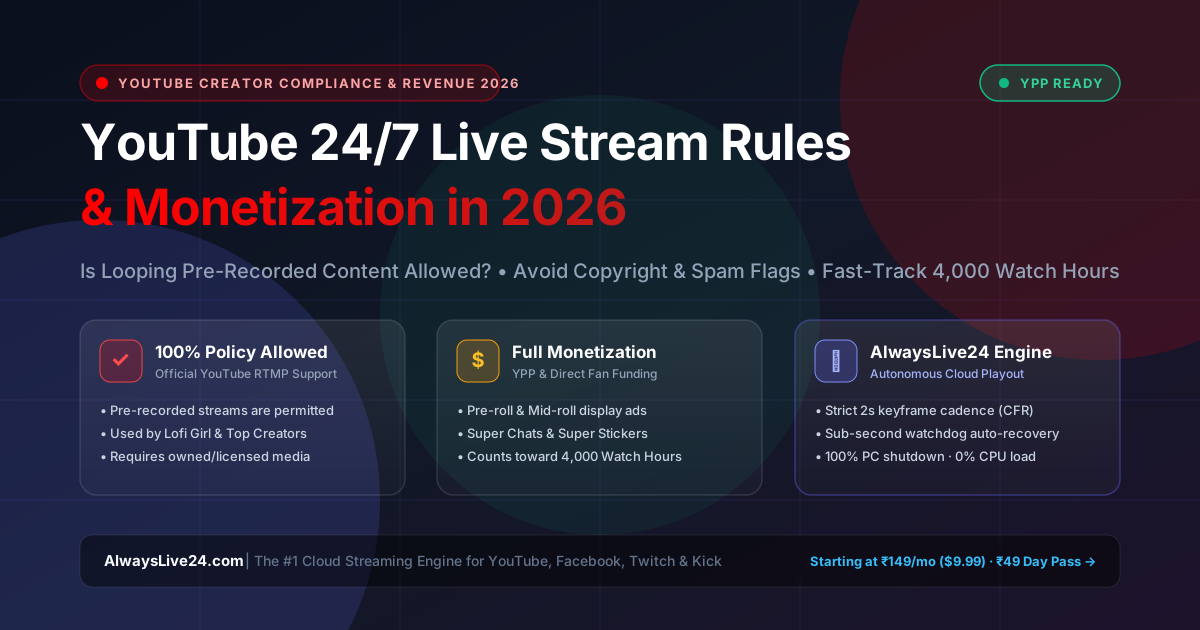
# YouTube 24/7 Live Stream Rules & Monetization in 2026: Is Looping Pre-Recorded Content Allowed? (Complete Creator Guide)

One of the most frequently asked questions by scaling digital creators, music curators, podcasters, and online businesses in 2026 is:
> **"Does YouTube allow 24/7 live streaming of looped or pre-recorded videos, and can these streams be legally monetized with AdSense, Super Chats, and Memberships without risking channel termination?"**
The short answer is **YES—YouTube fully permits 24/7 live streaming of pre-recorded and looped content**, and thousands of world-renowned channels (such as *Lofi Girl*, *ChilledCow*, *NASA live Earth views*, *Bloomberg Live News*, and independent gaming creators) generate thousands of dollars each month doing exactly that.
However, YouTube enforces strict **Community Guidelines, Copyright Standards, and Spam/Repetitive Content Policies**. If you broadcast unlicensed commercial music, scrape other people's videos, or use unstable local encoders that drop frames and trigger spam flags, your stream can be terminated or demonetized.
In this definitive 2026 creator guide, you will learn the official YouTube live streaming guidelines, how YouTube Partner Program (YPP) monetization works on continuous streams, the 4 non-negotiable rules to avoid strikes, and how to execute a 100% compliant 24/7 broadcast from the cloud using **[AlwaysLive24](https://alwayslive24.com)** without ever keeping your personal computer running.
---
## 📌 Executive Summary & Key Takeaways
1. **Official Policy Clarification**: YouTube's Terms of Service and Community Guidelines do **not** forbid looping pre-recorded content via RTMP encoders, provided you own 100% of the rights or hold explicit commercial licensing.
2. **YPP Monetization Eligibility**: Live streams generate revenue through **Pre-Roll, Mid-Roll automated display ads, Super Chats, Super Stickers, and Channel Memberships**.
3. **4,000 Watch Hours Acceleration**: Public live stream watch hours **count directly toward YouTube Partner Program (YPP) monetization thresholds**. A single 24/7 continuous stream running with just 25 concurrent viewers accumulates **4,200 watch hours in less than 7 days**!
4. **The 12-Hour Stream Archive Rule**: YouTube automatically archives and processes live streams into permanent VODs only up to **12 hours**. Beyond 12 hours, the live stream continues broadcasting smoothly on air, but historical replay segments older than 12 hours may not be saved into the single archived VOD.
5. **Zero Hardware Strain with AlwaysLive24**: Rather than leaving your laptop or PC on for weeks (facing overheating, noisy fan degradation, and home Wi-Fi drops), **[AlwaysLive24](https://alwayslive24.com)** runs your broadcast inside dedicated Linux cloud containers with 1 Gbps fiber connectivity. You can shut down your PC completely.
---
## 🏗️ The 2026 YouTube 24/7 Live Stream Architecture
Below is the verified compliance and monetization workflow that powers high-earning 24/7 YouTube channels:

---
## ⚖️ Official YouTube Policies: Is 24/7 Streaming Allowed?
Let's examine YouTube's official documentation regarding live broadcasting and pre-recorded media:
### 1. YouTube RTMP Protocol Standard
YouTube provides custom RTMP ingestion endpoints (`rtmp://a.rtmp.youtube.com/live2`) and persistent stream keys inside **YouTube Studio Live Dashboard**. YouTube's ingestion architecture does not differentiate between an optical webcam feed, an interactive gaming desktop, or a pre-rendered high-bitrate video loop delivered via FFmpeg. As long as your stream transmits compliant **H.264 video at 30 or 60 FPS with AAC audio and a strict 2-second keyframe interval (GOP size = 60)**, YouTube's ingest servers accept and distribute the broadcast seamlessly.
### 2. The Misconception About "Repetitive Content"
Many creators confuse YouTube's **Reused Content** policy for VOD uploads with 24/7 live streaming:
- **What YouTube Reused Content Policy Forbids**: Mass-uploading 50 identical standalone video files (VODs) to your channel library to spam search rankings.
- **What YouTube Encourages**: A single, continuous, round-the-clock live radio station or broadcast hub (e.g., "24/7 Chill Gaming Beats", "24/7 Relaxing Rain Sounds", or "Non-Stop Live Community Podcast"). YouTube's recommendation engine actively rewards active live streams with high viewer retention by featuring them prominently in **Browse Features** and **Suggested Videos**.
---
## 💰 How 24/7 YouTube Live Streams Make Money in 2026
Monetizing a 24/7 live stream is significantly more diversified than standard video uploads:
| Monetization Channel | How It Works on 24/7 Live Streams | Revenue Potential |
| :--- | :--- | :--- |
| **Mid-Roll & Pre-Roll Video Ads** | Automated ad insertions triggered every 15, 30, or 60 minutes for live viewers. | **₹25,000 – ₹1,50,000 / month ($300 – $2,000+)** depending on geography & niche. |
| **Super Chats & Super Stickers** | Live viewers pay to pin their messages and colorful animations at the top of the live chat. | Highly lucrative for gaming, spirituality, music requests, and interactive communities. |
| **Channel Memberships** | Monthly recurring subscriptions (e.g., ₹89/mo or $4.99/mo) granting custom badges and exclusive emojis. | Compounding recurring revenue that pays consistently month after month. |
| **Affiliate & Merch Pinned Links** | Pinned live chat messages promoting affiliate products, software, or digital goods. | Consistent passive conversion as thousands of daily viewers cycle through the stream. |
| **YouTube Premium Revenue** | YouTube pays creators a share of YouTube Premium subscribers' membership fees based on watch time. | Substantial earnings because live viewers frequently leave 24/7 streams running in the background. |
---
## 🛡️ The 4 Non-Negotiable Rules to Avoid Strikes & Bans
To protect your channel and ensure zero interruptions from YouTube's automated Content ID and spam detection systems, adhere strictly to these 4 golden rules:
### Rule 1: Own 100% of Audio & Video Intellectual Property
Never broadcast commercial radio tracks, copyrighted anime episodes, or unauthorized sports streams.
- Use **100% royalty-free or copyright-cleared audio** (e.g., Epidemic Sound, Artlist, Lickd, or AlwaysLive24's built-in copyright-safe Lo-Fi library).
- For visuals, use your own pre-recorded gameplay, animations you commissioned or created, video podcasts, or royalty-free ambient loops.
### Rule 2: Provide Clear, Honest Metadata & Categorization
Avoid deceptive "clickbait" titles that promise one thing while streaming another (e.g., titling a pre-recorded gaming clip "GTA 6 Official Gameplay LIVE Now").
- Use transparent titles such as:
* *"24/7 Relaxing Lo-Fi Beats to Study/Relax/Chill to [Looped Live Stream]"*
* *"24/7 Rain & Thunder Sounds for Sleep & Insomnia Relief | Continuous Loop"*
- Select the appropriate category (e.g., `Music`, `Gaming`, or `Entertainment`) in your YouTube Studio Live settings.
### Rule 3: Enable Automated Live Chat Moderation
Spam bots and malicious links in live chat can trigger automated YouTube safety flags.
- In **YouTube Studio → Community Settings**, turn on **Hold potentially inappropriate chat messages for review**.
- Connect automated moderation bots such as **Nightbot** or **Streamlabs Cloudbot** to automatically delete spam links and duplicate text.
- Create a pinned message welcoming viewers and inviting them to subscribe or join channel memberships.
### Rule 4: Use a Broadcast-Grade Cloud Playout Engine
If you try to stream 24/7 from a home laptop using OBS, power outages, Wi-Fi latency spikes, and system updates will repeatedly disconnect your broadcast. Repeatedly restarting a live stream dozens of times per day triggers YouTube's automated anti-spam ingestion rate limits.
With **[AlwaysLive24](https://alwayslive24.com)**, your stream runs on tier-3 enterprise datacenters with 99.99% uptime, unmetered 1 Gbps fiber bandwidth, and an automated sub-second watchdog recovery engine.
---
## 🎥 Watch: Complete Cloud Live Streaming Tutorial
For a complete step-by-step visual demonstration of how cloud playout functions without keeping your computer on, watch our official engineering walkthrough:
---
## ⚙️ Step-by-Step Setup: Launching a 24/7 YouTube Stream in 3 Minutes
Here is how you can set up a rock-solid, 100% policy-compliant 24/7 live stream on YouTube using AlwaysLive24:
### Step 1: Obtain Your Persistent YouTube Stream Key
1. Log in to **[YouTube Studio](https://studio.youtube.com)**.
2. Click the red **Create** button in the top right corner and select **Go Live**.
3. Choose **Stream** (Encoder Live).
4. Under the **Stream Settings** tab, ensure **Stream URL** is set to `rtmp://a.rtmp.youtube.com/live2`.
5. Copy your **Stream Key** (keep this secret; do not share it publicly).
6. Enable **Auto-start** and **Auto-stop** toggles if you want YouTube to manage broadcast states automatically.
### Step 2: Open AlwaysLive24 Cloud Studio & Ingest Media
1. Sign in to your dashboard at **[AlwaysLive24.com/app](https://alwayslive24.com/app)**.
2. Click **Create Live Stream**.
3. Choose your video source:
- **Upload Local File**: Upload MP4/MKV video up to 100MB on Free Starter, or up to 20GB+ on Pro plans.
- **Google Drive / Direct URL**: Paste a direct Google Drive link or cloud storage URL with 0MB local storage consumption!
- **Lo-Fi Radio Studio**: Select a pre-rendered 1080p ambient background and copyright-free chill tracks.
### Step 3: Configure YouTube RTMP & Enable 24/7 Infinite Loop
1. Under **Destination Platform**, select **YouTube Live**.
2. Paste your copied YouTube **Stream Key**.
3. Check the box: **Loop Stream (24/7 Infinite Loop)**.
4. Select your desired broadcast resolution (720p or 1080p).
5. Click **Start Live Broadcast**.
Within 5 to 10 seconds, AlwaysLive24's cloud engine establishes a secure RTMP handshake with YouTube's ingestion edge. Your broadcast goes live across the globe with pristine 1080p quality, 30 FPS constant framerate, and 0% CPU consumption on your device.
### Step 4: Shut Down Your PC & Monitor Live Telemetry
Once your stream card turns green with **"100% Online · Auto-Recovery Active"**, your computer's job is finished:
- You can safely close your browser tab, put your laptop to sleep, or shut down your desktop.
- The stream will continue broadcasting 24 hours a day, 7 days a week, 365 days a year.
- If YouTube's datacenter ever experiences a momentary packet drop, AlwaysLive24's background watchdog engine automatically resynchronizes the broadcast within 1 second.
---
## 📊 AlwaysLive24 vs Desktop OBS: Why Cloud Streaming Wins
| Feature / Metric | Desktop OBS Studio | AlwaysLive24 Cloud Engine |
| :--- | :--- | :--- |
| **PC Power Requirement** | Computer must stay ON 24/7 | **100% Cloud (Turn PC completely OFF)** |
| **Hardware Electricity Cost** | ₹800 – ₹2,500 ($10 – $30) / month | **₹0.00 (Handled by datacenter)** |
| **Hardware Thermal Degradation** | High GPU/CPU wear, fan noise, dust | **Zero local hardware wear** |
| **Internet Reliability** | Vulnerable to home Wi-Fi & ISP drops | **1 Gbps Unmetered Datacenter Fiber** |
| **Google Drive Ingest** | Must download entire file locally | **Stream direct with 0MB disk used** |
| **Automated Failover** | Stream dies if home power cuts | **Instant Sub-Second Watchdog Recovery** |
| **Starting Price** | Free (High hidden electricity costs) | **₹149 / mo ($9.99) · ₹49 ($1.99) Day Pass** |
---
## 💳 Transparent Pricing: Start Today for Under ₹50 / $2
Unlike legacy services that demand $39–$89/month contracts, AlwaysLive24 offers flexible options designed specifically for modern creators:
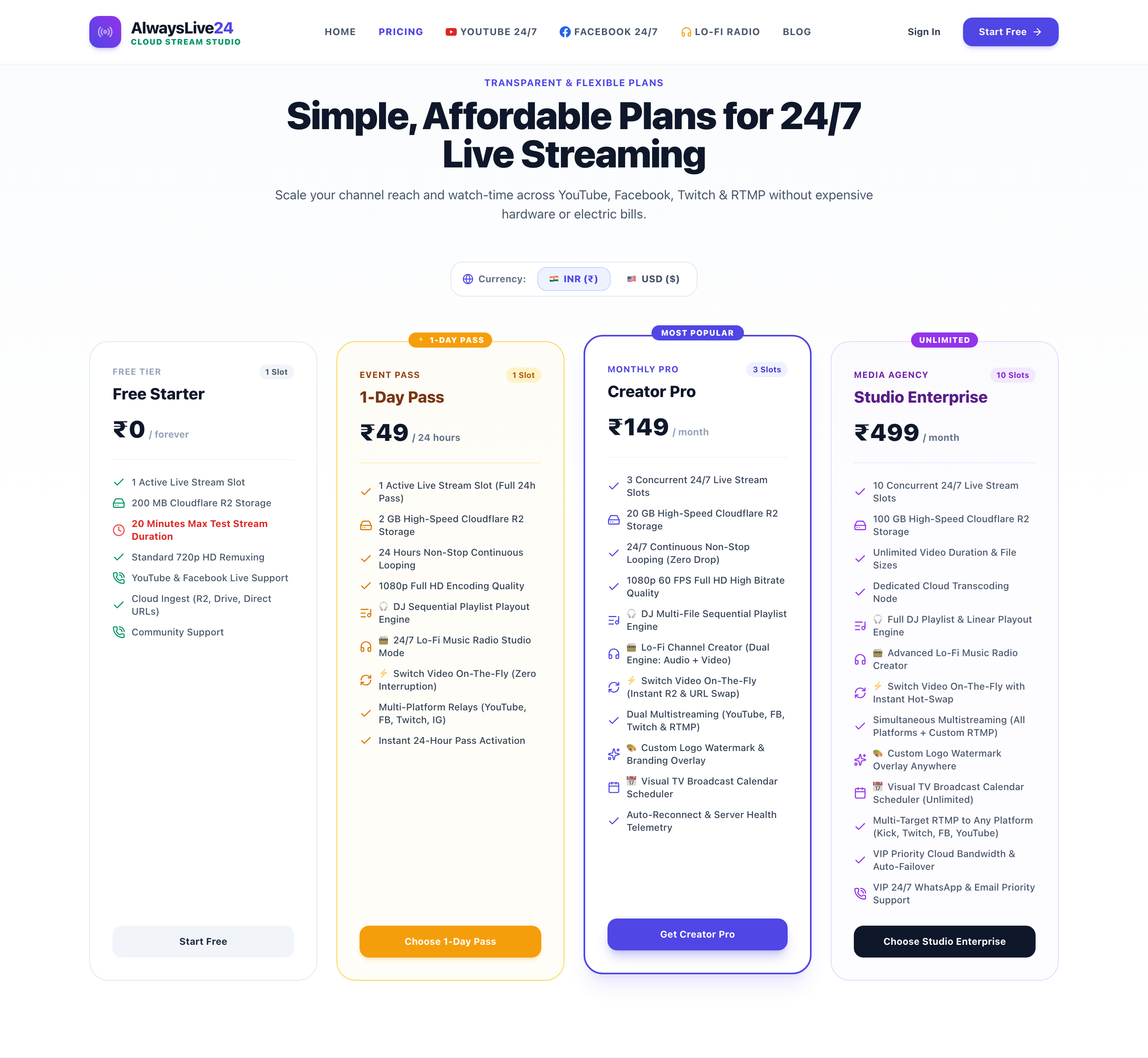
- **Free Starter (₹0)**: Test the platform with 100 MB cloud storage and 1 live stream slot.
- **24-Hour Day Pass (₹49 / $1.99)**: Zero monthly commitment. Perfect for running a special weekend marathon, product launch, or holiday stream.
- **Creator Pro (₹149 / $9.99/mo)**: The gold standard for YouTube creators. Up to 3 simultaneous 24/7 live streams, 20 GB Cloudflare R2 edge vault, unlimited streaming hours, and multi-RTMP simulcasting.
- **Studio Enterprise (₹499 / $29.99/mo)**: 8 simultaneous stream slots, 50 GB cloud storage, priority transcoding, and VIP support.
Domestic UPI, Paytm, PhonePe, Google Pay, Credit/Debit cards, and international payment methods are fully supported with instant automated activation.
---
## 🏁 Frequently Asked Questions (FAQ)
### Does watch time from 24/7 live streams count toward the 4,000 hours required for YouTube monetization?
**Yes!** Public live stream watch time counts directly toward the 4,000 public watch hours needed to join the YouTube Partner Program (YPP). Because 24/7 streams run around the clock, viewers accumulate hundreds of hours while studying, sleeping, or working.
### What happens after a live stream exceeds 12 hours on YouTube?
YouTube automatically records and archives live streams into standard video replays (VODs) up to a maximum length of 12 hours. If your stream runs continuously past 12 hours, the live broadcast itself does **not** stop—it will continue streaming 24/7. However, the historical replay buffer beyond the 12-hour mark will not be saved into a single archival VOD. For 24/7 radio and looping streams, this is completely normal and standard industry practice.
### Can I get a copyright strike for looping my own YouTube video?
No. You own the copyright to your original content. As long as the video does not contain third-party copyrighted audio, visual clips, or unlicensed background music, you have the full legal right to broadcast your media on an infinite loop.
### Do I need high-speed internet at home to stream 24/7 with AlwaysLive24?
No! You only need enough internet to upload your video once to the cloud (or paste a Google Drive link). Once your video is in your AlwaysLive24 cloud library, all live video encoding and continuous RTMP transmission occurs inside high-speed datacenters with 1 Gbps fiber uplinks.
---
## 🚀 Launch Your 24/7 YouTube Stream Today
24/7 live streaming is one of the most powerful organic growth levers available to digital creators in 2026. By adhering to YouTube's copyright guidelines and utilizing dedicated cloud infrastructure, you can build an evergreen traffic engine that generates subscribers, watch hours, and ad revenue while you sleep.
Ready to launch your first 24/7 broadcast without keeping your computer on?
👉 **[Get Started for Free on AlwaysLive24](https://alwayslive24.com/pricing)** — Launch your first 24/7 stream slot in under 3 minutes with zero credit card required!
Share this tutorial: