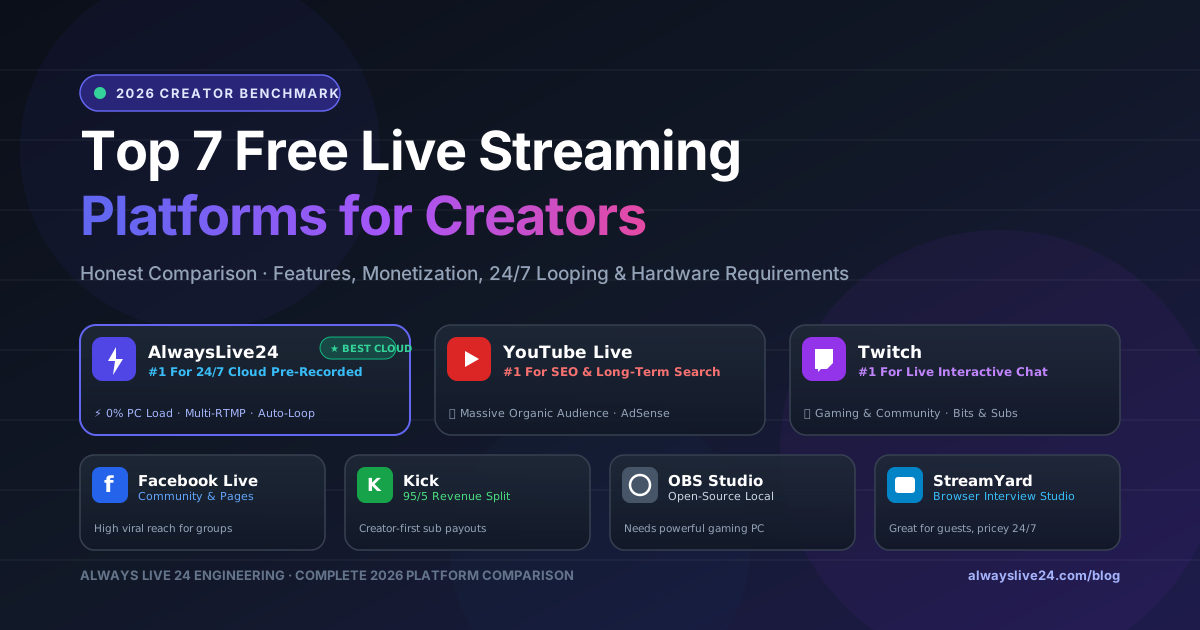
In 2026, live streaming is no longer limited to high-end gaming studios or professional television broadcast rooms. Whether you are an independent creator trying to hit YouTube monetization, a podcaster syndicating episodes across Facebook and Twitch, a business streaming 24/7 customer product demos, or a musician broadcasting continuous lo-fi radio beats, choosing the right live streaming platform can make or break your channel's growth.
However, the live streaming landscape has fractured into three completely different categories of tools:
- Destination Platforms: Where viewers watch your stream (YouTube Live, Twitch, Kick, Facebook Live).
- Local Desktop Encoders: Software installed on your computer that captures your webcam, screen, and mic (OBS Studio, Streamlabs).
- Cloud Playout & Looping Studios: Modern cloud engines that broadcast pre-recorded videos and playlists 24/7 on autopilot without requiring any computer, phone, or OBS to stay on (AlwaysLive24).
In this definitive 2026 benchmark, we compare the Top 7 Free Live Streaming Platforms side-by-side. We evaluate each on its real hardware requirements, free plan limitations, monetization potential, 24/7 looping capability, and ease of use.
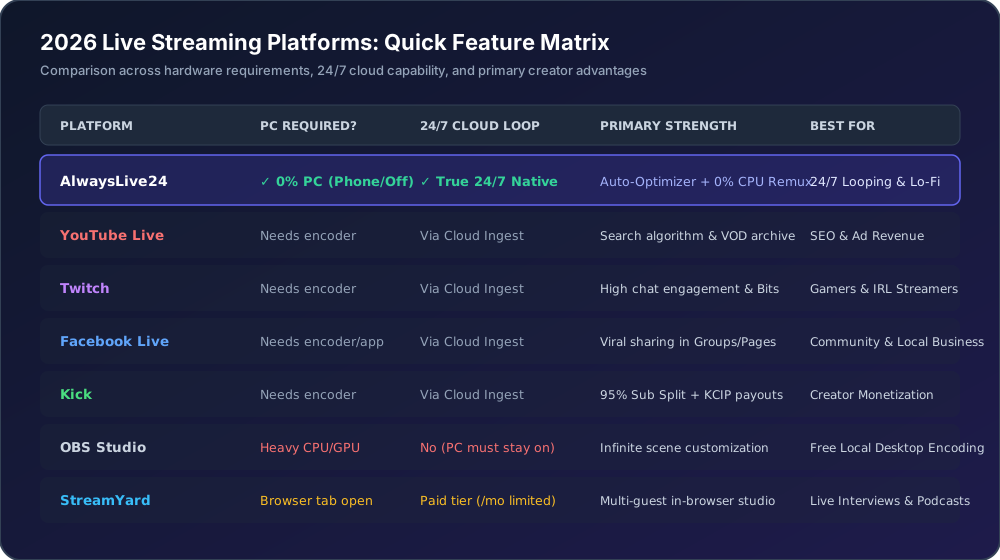
Quick Comparison: Top 7 Live Streaming Platforms at a Glance
| Platform | Category | PC Required? | 24/7 Cloud Loop | Best For |
|---|---|---|---|---|
| 1. AlwaysLive24 | Cloud Playout Studio | No (0% CPU, Phone/Off) | Yes (Infinite Native) | 24/7 Pre-recorded, Lo-Fi Radio, Multi-RTMP |
| 2. YouTube Live | Destination | Depends on Ingest | Via Cloud Ingest | SEO, Long-term VOD Search, AdSense |
| 3. Twitch | Destination | Depends on Ingest | Via Cloud Ingest | Gaming, Interactive Chat, Bits & Subs |
| 4. Kick | Destination | Depends on Ingest | Via Cloud Ingest | 95/5 Subscription Split, Fast Creator Growth |
| 5. Facebook Live | Destination | Depends on Ingest | Via Cloud Ingest | Facebook Pages, Groups & Community Reach |
| 6. OBS Studio | Local Desktop Encoder | Yes (Heavy CPU/GPU) | No (PC must stay running) | Free Desktop Scene Control & Screen Capture |
| 7. StreamYard | Browser Studio | Yes (Browser tab open) | No (/mo limited) | Podcasts, Live Interviews with Multiple Guests |
1 AlwaysLive24: Best for 24/7 Cloud Looping & Multi-Platform Ingest
If your goal is to broadcast pre-recorded videos, religious sermons, gaming replays, or round-the-clock lo-fi music stations without buying an expensive gaming PC or paying massive electric bills, AlwaysLive24 is in a league of its own.
Unlike desktop software, AlwaysLive24 operates entirely inside enterprise European cloud containers. You upload your video once (or paste a direct video link), paste your YouTube, Facebook, Twitch, or Kick stream key, enable 24/7 Infinite Loop, and click Start. Once launched, you can close your browser, shut down your laptop, or turn off your smartphone — our cloud servers continuously broadcast to your channel with 99.9% uptime.
- 0% PC Load: Your computer or phone can be completely powered off.
- Auto-Optimizer on Upload: Automatically fixes phone HEVC/H.265 videos to 0% CPU standard H.264 CFR 30fps.
- 24/7 Lo-Fi Radio Creator: Combine background art + audio playlists into a live radio station.
- Rotating Residential Proxy: Protects against YouTube bot detection blocks.
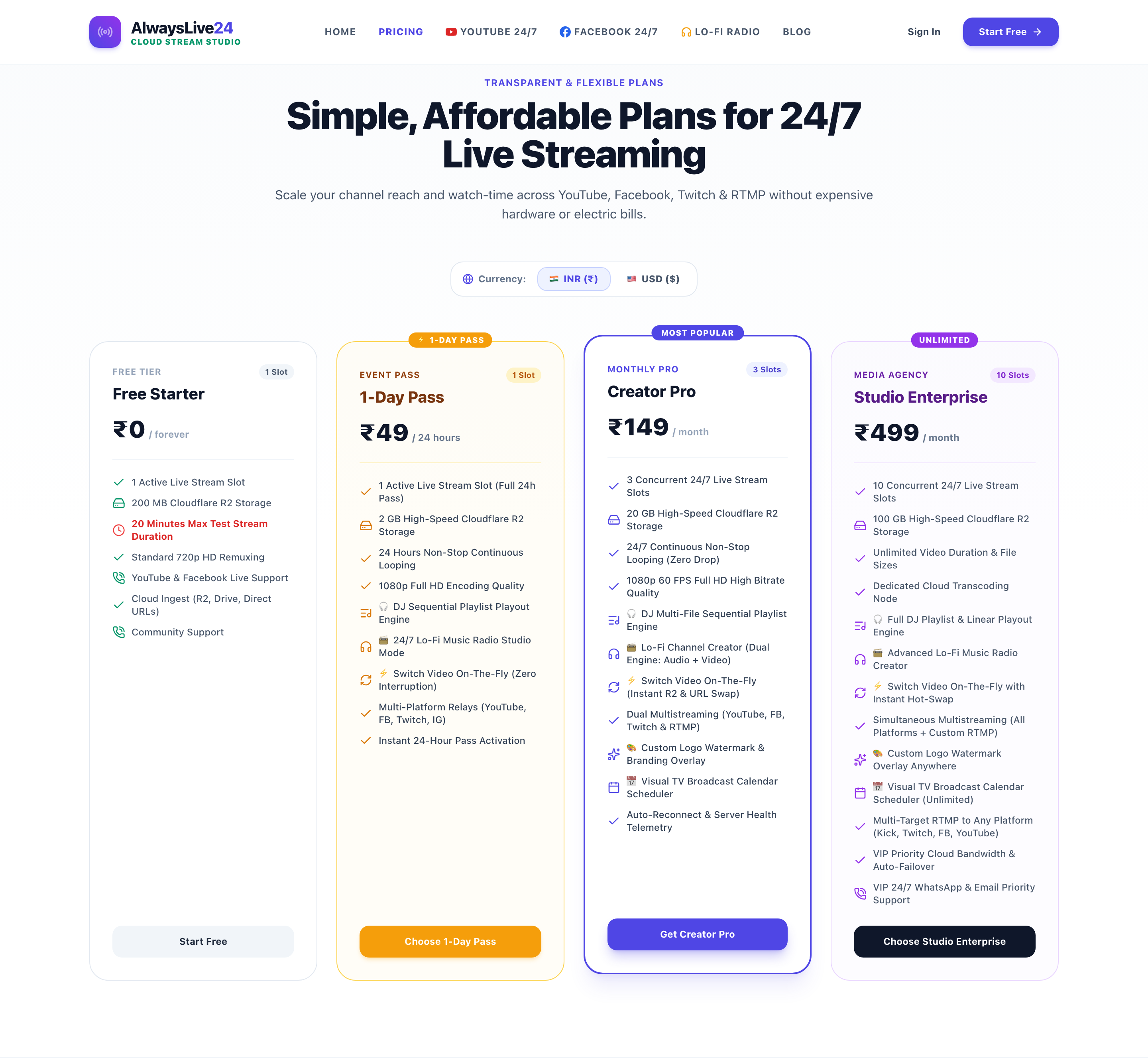
- Free Starter Plan: 200 MB storage quota & 1 active stream slot free forever.
- Designed primarily for pre-recorded, automated, and looped broadcasting (not for live webcam talk shows with guests).
- Free plan includes standard AlwaysLive24 branding; paid plans (from just ₹49 / .99) are 100% watermark-free.
2 YouTube Live: Best for SEO, Discoverability & Evergreen Monetization
YouTube Live remains the undisputed heavyweight champion of live streaming platforms for creators who care about long-term video discovery. When you stream on YouTube, your live video doesn't just disappear into the ether when the stream finishes — YouTube automatically converts it into a permanent high-definition VOD (Video on Demand) indexed by Google Search.
Because YouTube's algorithm gives preferential ranking to live broadcasts in browse features and recommended sidebars, 24/7 live streams on YouTube frequently generate 5x to 15x higher watch-time hours than regular uploads, allowing creators to hit the 4,000-hour monetization threshold rapidly.
- Largest global audience with 2.7 billion active users.
- Stream VODs rank in Google and YouTube search forever.
- Built-in Google AdSense monetization, Super Chats, Super Stickers, and Channel Memberships.
- Supports up to 4K 60fps RTMP/HLS ingest with zero platform hosting fees.
- YouTube does not host pre-recorded looping files natively — you must feed it via an RTMP ingest tool like AlwaysLive24 or OBS.
- Strict copyright matching (Content ID) can mute audio if unauthorized music is broadcast.
3 Twitch: Best for Gaming Communities & Interactive Chat Culture
Owned by Amazon, Twitch remains the cultural home of real-time community engagement. If your content revolves around esports, live gaming commentary, speedruns, or interactive chat-driven entertainment, Twitch's live chat ecosystem (emotes, channel points, raids, badges) has no equal.
However, Twitch has notoriously poor internal search discoverability for new channels. Unless you bring an existing audience from TikTok, Twitter, or YouTube, starting from zero on Twitch can feel like streaming to an empty room. To solve this, smart creators use AlwaysLive24 to multistream simultaneously to Twitch and YouTube, converting YouTube search visitors into Twitch community subscribers.
- Best-in-class interactive live chat with custom channel emotes and bots.
- Loyal gaming audience accustomed to tipping via Bits and Subscriptions.
- Twitch Prime gaming integration gives free monthly subscriptions to Amazon Prime members.
- Standard 50/50 subscription revenue split (lower than Kick's 95/5).
- VODs are deleted after 14 to 60 days, providing zero long-term search value.
4 Kick: Best for Creator-Friendly Monetization (95/5 Revenue Split)
Launched as a direct challenger to Twitch's restrictive policies, Kick has exploded in creator popularity through its industry-leading 95% subscription revenue split (where creators keep .75 of every .00 subscription) and the Kick Creator Incentive Program (KCIP), which pays verified streamers an hourly wage based on viewer engagement.
Because Kick supports standard RTMP keys (), you can easily connect your Kick stream key into AlwaysLive24 to keep your Kick channel live 24/7 with game walkthroughs or highlight reels, unlocking Kick affiliate status in record time.
- 95/5 Subscription Split: Highest direct payout in the live streaming industry.
- Hourly creator pay via Kick Creator Incentive Program for eligible channels.
- Less saturated browse categories, making early channel discovery easier than Twitch.
- Smaller overall viewer base compared to YouTube or Twitch.
- Requires RTMP encoder tool to stream content.
5 Facebook Live: Best for Local Businesses, Regional Pages & Groups
While gamers gravitate towards Twitch and Kick, Facebook Live remains an absolute powerhouse for regional news, podcasters, local businesses, churches, temples, educational institutes, and community groups. Facebook's social graph is engineered around viral algorithmic feed sharing — when one viewer likes, comments on, or shares your live broadcast, it immediately appears in the news feeds of their friends and mutual group members.
Using AlwaysLive24, page managers can replay weekly Sunday services, product launch webinars, or podcast archives on a recurring 24/7 loop, consistently harvesting fresh followers without lifting a finger.
- Viral social sharing inside targeted Facebook Groups and Pages.
- High engagement with older demographics (ages 25–65+).
- Facebook Stars tipping and In-Stream Video Ads for monetized pages.
- Requires RTMPS (secure RTMP) ingest on port 443.
- Video archives are harder to discover via generic web search engines compared to YouTube.
6 OBS Studio: Best Free Open-Source Local Desktop Encoder
Open Broadcaster Software (OBS Studio) is the open-source backbone of modern live streaming. Free and available for Windows, Mac, and Linux, OBS gives you granular control over multiple webcam angles, audio mixers, green screen chroma keys, on-screen overlays, chat alerts, and screen captures.
However, OBS is a local desktop encoder, not a cloud server. If you want to stream for 24 hours straight using OBS, your computer must stay powered on 24 hours straight with fans spinning at maximum speed. If your laptop battery dies, your home Wi-Fi hiccups, or your PC goes to sleep, your live stream abruptly crashes. That is why creators pair OBS for live gaming and switch to AlwaysLive24 for 24/7 passive looping.
- 100% Free and open-source with no watermarks or artificial limits.
- Thousands of free community plugins, transitions, and audio filters.
- Complete control over bitrate, keyframes, encoders (NVENC, x264, QuickSync).
- Massive CPU/GPU burden: Causes laptop overheating, battery wear, and high electricity bills.
- Cannot run in the cloud — shuts off whenever your computer shuts down.
7 StreamYard: Best for In-Browser Multi-Guest Interviews & Podcasts
StreamYard revolutionized live streaming by bringing the entire broadcast studio into a standard Google Chrome tab. You don't need to install OBS or configure audio drivers — you send your guest a private link, they click it, and their webcam appears on-screen beside yours with clean split-screen templates and on-screen audience comment highlights.
However, StreamYard was built for live interviews, not for 24/7 background streaming. Its free plan places an obtrusive duck watermark in the top corner of your stream, caps streaming at 20 hours per month, and requires your browser tab to stay active. For continuous 24/7 looping, AlwaysLive24 is the dedicated, cost-effective alternative.
- Zero installation: Runs directly inside any modern web browser.
- Invite up to 10 guests with a simple clickable URL.
- Show live viewer comments directly on the broadcast screen with one click.
- Free plan displays a prominent watermark and caps broadcasting at 20 hours/month.
- Pre-recorded streaming requires their highest plan (9/mo) with strict 1-hour duration limits.
How to Broadcast to Multiple Free Platforms Simultaneously (Without Overheating Your PC)
Why limit yourself to a single platform? The most successful creators in 2026 practice Multi-RTMP Syndication: they upload a video once to AlwaysLive24, and broadcast it to YouTube Live, Facebook Live, Twitch, and Kick simultaneously.
3 Easy Steps to Launch Your First 24/7 Live Stream:
- Upload or Paste Your Video: Add your video file to your private Cloud Storage, or paste a direct Google Drive / YouTube video link (no disk space consumed).
- Paste Destination Stream Key: Select your destination platform (YouTube, Facebook, Twitch, Kick, or Custom RTMP) and paste your secret stream key.
- Enable 24/7 Infinite Loop & Launch: Check the 'Loop Stream' toggle and click 'Start Live Broadcast'. Your stream is immediately routed through our high-speed European servers. You can safely turn off your PC!
Frequently Asked Questions (FAQ)
Which live streaming platform is truly 100% free? ▼
Destination platforms like YouTube Live, Twitch, and Kick are 100% free to broadcast to with zero viewer caps. For encoding software, OBS Studio is free open-source software, and AlwaysLive24 provides a permanent Free Starter plan with 200 MB personal storage and 1 active stream slot without requiring any credit card.
Can I live stream 24/7 without keeping my laptop or PC on? ▼
Yes! While desktop encoders like OBS require your computer to stay powered on continuously, cloud platforms like AlwaysLive24 run the stream on dedicated cloud server hardware. You can turn off your laptop, shut down your phone, or lose internet connectivity without the live stream dropping on YouTube or Twitch.
Is it safe to stream pre-recorded video loops on YouTube? ▼
Yes, pre-recorded looping streams are widely used by massive channels like Lofi Girl, NASA, Bloomberg News, and major game studios. As long as you hold the copyright or broadcast rights to the audio and video you stream, YouTube fully monetizes pre-recorded 24/7 live broadcasts.
How does AlwaysLive24 prevent stream disconnects? ▼
AlwaysLive24 features an integrated Auto-Optimizer on Upload that re-encodes non-standard mobile phone video files (like HEVC/H.265 with inverted tracks) into standard CFR 30fps H.264 streams, enabling 0% CPU direct copy mode and preventing socket pipe drops. Our 24/7 watchdog engine continuously monitors stream health and auto-reconnects in under 3 seconds if network drops occur.
Launch Your 24/7 Cloud Live Stream in Under 2 Minutes
Stop overheating your computer with OBS. Join thousands of creators using AlwaysLive24 to broadcast pre-recorded video loops to YouTube, Facebook, Twitch, and Kick 24 hours a day with zero PC load.