
Traditional television broadcasting once demanded millions of dollars in satellite transponders, physical master control rooms (MCR), expensive SDI routing equipment, and dedicated broadcast automation servers. If an independent journalist, news publisher, religious foundation, or gaming network wanted to broadcast a round-the-clock linear TV channel, they had to hire engineering shifts to manually switch tapes and monitor video feeds.
In 2026, the entire broadcast paradigm has transformed. The explosion of FAST channels (Free Ad-supported Streaming TV) and automated cloud playout has democratized linear television. Today, any content creator, news organization, music curator, or spiritual community can launch an automated 24/7 Internet TV Channel or round-the-clock live news station that streams continuously on YouTube Live, Facebook Live, Kick, and custom web players—with 0% CPU load on your home computer, zero hardware costs, and complete freedom to turn your PC off.
1 Traditional Broadcast Master Control vs. Cloud FAST Channels
To understand why 24/7 streaming channels on YouTube and social platforms generate massive organic reach, compare traditional linear playout against modern cloud-native architectures:
| Feature Dimension | Traditional MCR Playout | Local OBS Machine (DIY) | AlwaysLive24 Cloud Playout |
|---|---|---|---|
| Hardware Required | $50,000+ SDI Servers & Racks | Dedicated high-end PC / GPU ($2,000+) | Zero PC Hardware (100% Cloud VPS) |
| Electricity & Cooling | Industrial HVAC & 3-Phase Power | ₹3,000 – ₹8,000 / month power bill | Zero Local Electricity Bill |
| Playout Uptime | 99.9% (Staffed shifts) | 75% – 85% (Crashes, updates, ISP drops) | 99.99% Cloud Uptime with Watchdog |
| Station Bug / Logo Overlay | Hardware Downstream Keyer (DSK) | High CPU composite filters in OBS | Cloud GPU Composite (0% Local CPU) |
| Simultaneous Destinations | Expensive Satellite Transponders | Multiplies home bandwidth & CPU | Cloud RTMP Tee (Simulcast YT, FB, Kick) |
| Monthly Operating Cost | $2,000 – $10,000 / month | $150 – $300 (Hardware wear + Power) | ₹149 / month ($9.99/mo) |

2 The 4 Most Popular 24/7 Internet TV Channel Formats
Automated 24/7 linear playout is not limited to legacy networks. Leading content creators, media publications, and communities across multiple sectors use round-the-clock streaming channels to capture audience mindshare:
24/7 Regional & Independent News Desks
Independent journalists, investigative networks, and regional news publishers create rotating news bulletin wheels. Instead of expecting viewers to click dozens of separate 3-minute clips, the channel loops a 30-to-60-minute curated news bulletin with breaking tickers and commentary. Whenever a breaking story occurs, the producer swaps the video file on-the-fly without disconnecting live viewers on YouTube.
24/7 Spiritual, Faith & Devotional Channels
Faith-based organizations, temple trusts, church ministries, and devotional creators (such as 24/7 Bhakti, Gospel, or Quranic recitation channels) broadcast round-the-clock prayers, holy chants, and sermon playlists. Because viewers leave these streams playing continuously on living room smart TVs, these channels regularly clock millions of watch-time hours every month.
Linear Music & Pop Culture Television (Modern MTV)
Lo-Fi beatmakers, synthwave artists, anime networks, and indie record labels run non-stop music video channels with automated sequential track advancement. By pairing visualizers or animated loops with high-bitrate AAC stereo audio, they build continuous virtual hangout spots for global audiences.
Gaming Tournaments, Esports & Retro Reruns
Gaming creators and esports organizers take classic tournament archives, speedruns, or episodic Let's Plays and stream them in continuous sequence. Rather than leaving high-value video archives dormant on their channels, they monetize legacy content through continuous live Super Chats and YouTube live ad revenue.
3 Step-by-Step Guide: Launching Your 24/7 Channel on AlwaysLive24
Follow this four-step walkthrough to assemble your media lineup, brand your channel with a station logo, and launch your automated 24/7 broadcast:
Organize Your Program Lineup in the Cloud
An Internet TV channel relies on a seamless sequence of high-definition video assets. You can ingest broadcast files into AlwaysLive24 through two high-speed methods:
- Personal Cloud Storage (Cloudflare R2 Edge Vault): Upload your MP4, MOV, or MKV program segments directly via the AlwaysLive24 dashboard. Files are stored in high-speed NVMe edge cache and stream into the broadcast pipeline with zero bandwidth cost.
- Direct Google Drive Integration: If your production team edits videos on Google Drive, simply copy the shareable link (set to "Anyone with the link can view") and paste it into AlwaysLive24. The streaming engine ingests the Google Drive stream directly without consuming local storage space.
For pristine playback on YouTube, Facebook, and mobile smart TVs, export your master videos with H.264 (AVC) Profile High Level 4.1, 1080p (1920x1080) at 30 or 60 FPS, AAC-LC Stereo 44.1 kHz (128–192 kbps), and a strict 2-second keyframe interval (GOP = 60 frames).
Configure Your Linear Playout Queue & Playlist
Inside the AlwaysLive24 Studio Dashboard, click Create Stream Slot to configure your linear playout channel:
- Select Broadcast Engine: Choose Single Video Continuous Loop if your TV station broadcasts a rolling 2-hour or 4-hour news wheel. Choose DJ Playlist / Linear Playout if your station features episodic programming (Show A → Commercial Break → Show B).
- Enable 24/7 Continuous Loop: Check the 24/7 Continuous Loop checkbox. When the final video in your programming block concludes, the playout engine seamlessly loops back to Track 1 without dropping the RTMP connection or buffering on YouTube.
- Choose Playout Mode: Select Auto / Original Quality (0% CPU Direct Remux) for direct packet copying, or Vertical 9:16 Playout if broadcasting to mobile viewers on YouTube Shorts / TikTok Live.
Add Your Station Bug & Channel Logo Branding
Every professional TV network features a station watermark in the corner of the screen. In AlwaysLive24, you can brand your linear stream directly in the cloud:
- Under Advanced Feature: Logo Watermark Overlay, upload your transparent PNG station bug (recommended: 500x500 PNG with alpha channel).
- Select Screen Position: Choose
Top Right,Top Left,Bottom Right, orBottom Left. - Configure Size & Opacity: Choose
Small(recommended for sleek broadcast TV bugs ~8% of screen) toMedium. Set opacity between 70% and 90% so the watermark looks professional and doesn't obstruct subtitles. - The cloud engine composites the watermark directly onto video frames during cloud playout with zero performance impact on your computer.
Configure Multi-Platform RTMP Simulcasting
AlwaysLive24 features native Simultaneous Multi-Destination RTMP Playout so you can broadcast your 24/7 Internet TV feed to all platforms at once:
- Primary Destination (YouTube Live): In YouTube Studio → Create → Go Live, copy your RTMP Ingestion Server URL (
rtmp://a.rtmp.youtube.com/live2) and Stream Key into AlwaysLive24. - Secondary Destination 1 (Facebook Live): Click Add Platform Destination, select Facebook, and paste your Facebook Stream Key (
rtmps://live-api-s.facebook.com:443/rtmp/). - Secondary Destination 2 (Kick, Twitch, or Custom Web TV): Add Kick, Twitch, or your website's private RTMP/HLS ingestion endpoint.
- Click Start Broadcast. Within 5 seconds, your cloud container spins up, connects to all social media destinations simultaneously, and initiates continuous 24/7 linear playout!
4 Autonomous Telemetry & 5-Second Auto-Recovery Watchdog
Once your TV station is on the air, monitoring and reliability are paramount. If your home internet drops or if a local OBS computer crashes, your live stream abruptly dies, instantly resetting your channel's viewership algorithm.
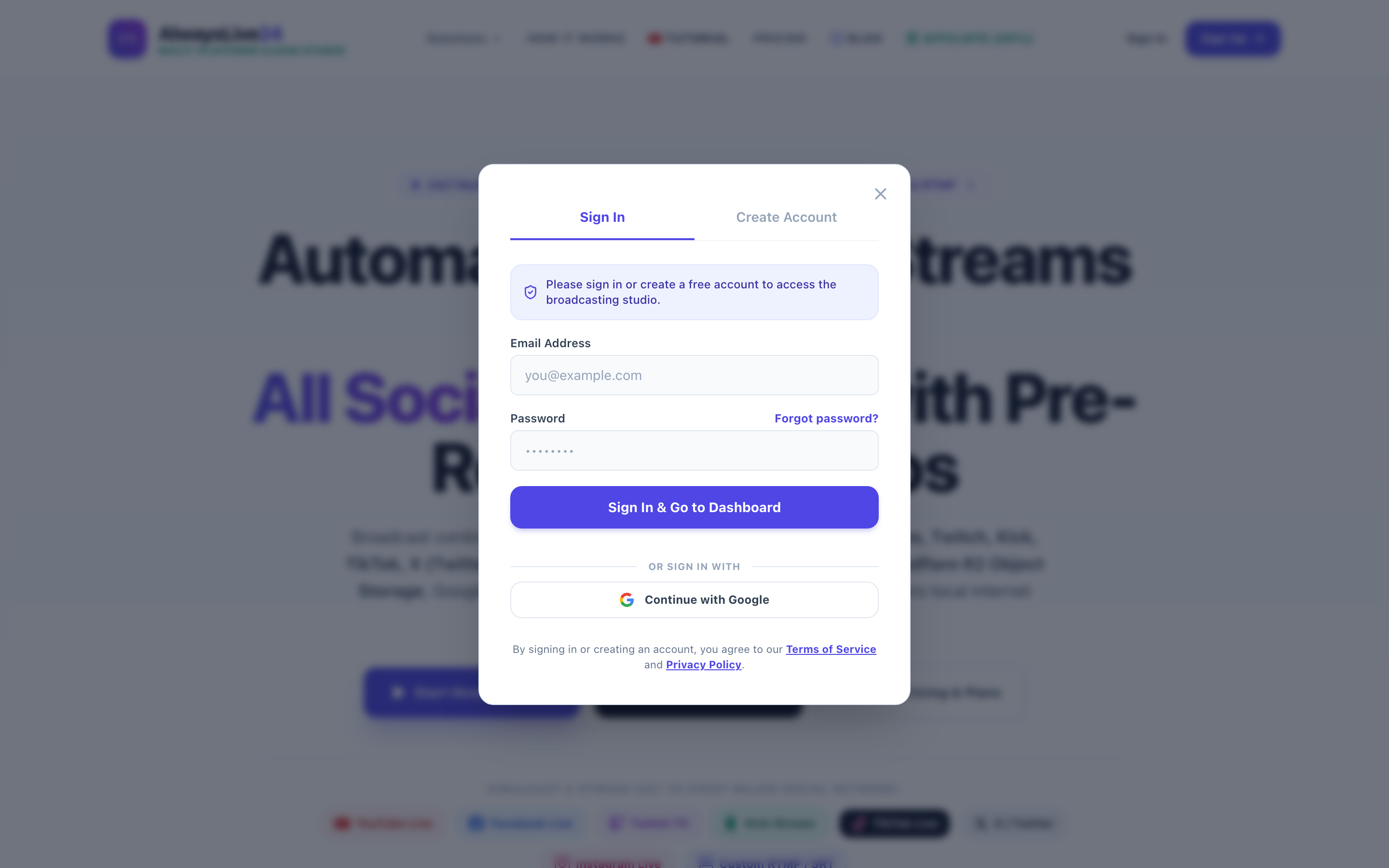
0% Local Computer Load
The broadcasting engine runs on high-speed Hetzner dedicated cloud infrastructure with unmetered 1 Gbps fiber. Your PC does zero work. You can turn off your laptop or travel anywhere.
5-Second Stall Watchdog
If YouTube or Facebook experiences a network hiccup or TCP socket stall, our daemon detects it within 5 seconds and automatically heals the stream with zero downtime.
Live Bitrate & FPS Telemetry
Monitor real-time FPS (locked at 30 or 60 FPS), output bitrate (2500 kbps to 4500 kbps), and connection health directly from your Mission Control dashboard.
5 Monetization Strategies for 24/7 Internet TV Channels
How do creators turn a 24/7 cloud TV stream into recurring monthly revenue? Here are the four most profitable monetization models in 2026:
1. YouTube Live Automated Mid-Roll Ads & Super Chats
YouTube automatically serves dynamic pre-roll and mid-roll video ads to live stream viewers. Dedicated fans can also send Super Chats and channel memberships during the broadcast.
2. Sponsored Commercial Breaks (Program Insertion)
Just like cable television, you can sell 15-second or 30-second sponsor slots directly to brands. Insert sponsor video files between scheduled show episodes in your DJ Playlist queue and keep 100% of the advertising revenue.
3. On-Screen Affiliate QR Codes & Lower-Thirds
Embed subtle QR codes or lower-third banners into your pre-recorded video assets. Viewers watching on smart TVs or laptops scan the QR code with their mobile phones to make instant purchases.
4. FAST Channel Distribution & Web TV Embeds
Embed your live stream player directly on your website. Monetize your website traffic using Google AdSense for Video while simultaneously growing your YouTube subscriber base.
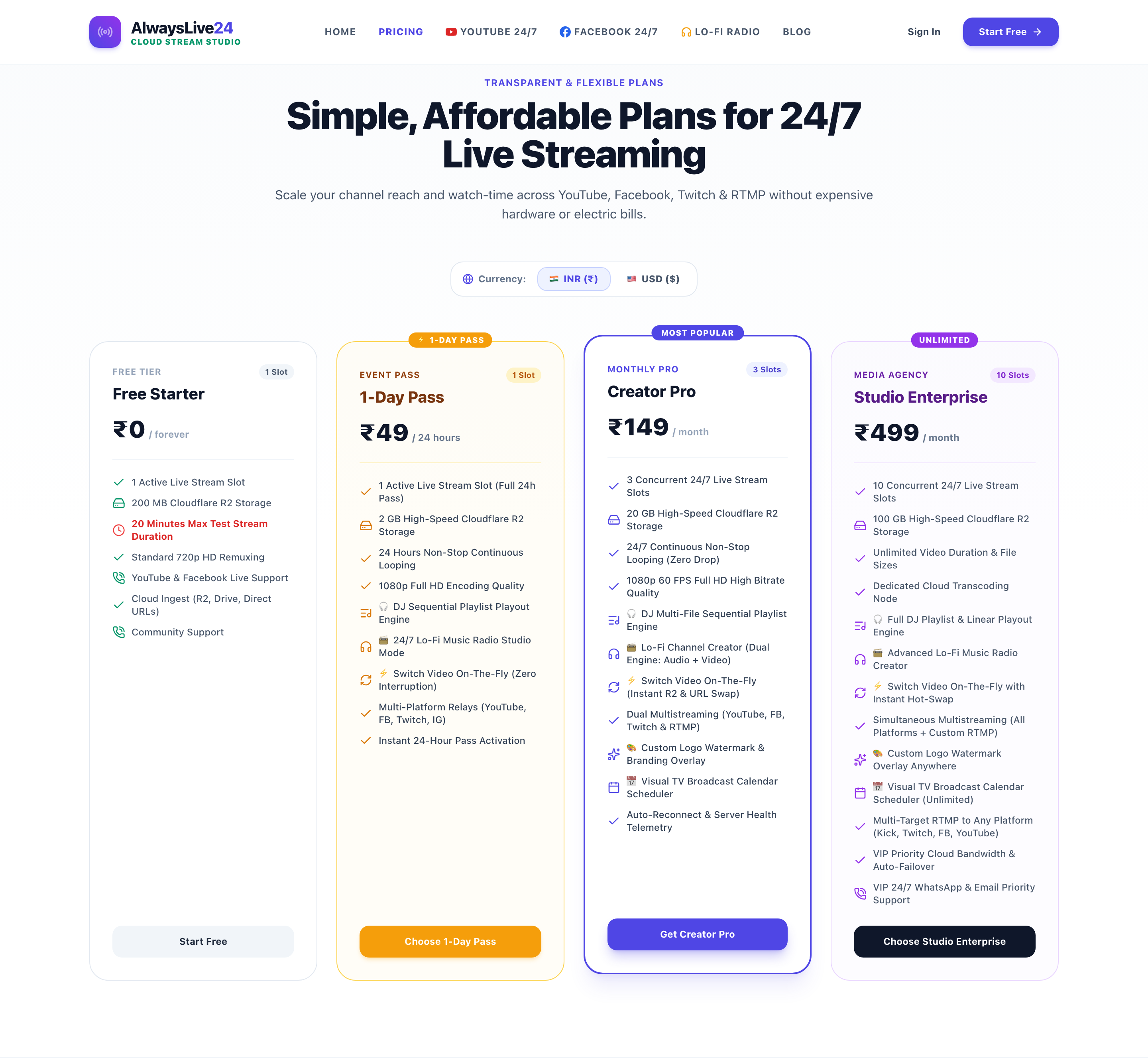
6 Transparent Cloud Streaming Pricing for Creators
Unlike traditional broadcast playout providers who demand enterprise sales calls and $500+ monthly minimums, AlwaysLive24 offers straightforward, creator-first pricing:
7 Frequently Asked Questions (FAQ)
Can I change or update the video playlist while the stream is live?
Yes! With AlwaysLive24's on-the-fly Hot-Swap engine, you can update playlist items or switch broadcast sources without interrupting the live stream on YouTube or Facebook. Viewers experience zero black screens or stream disconnections.
What happens if my home internet disconnects or power cuts out?
Nothing happens to your stream! AlwaysLive24 runs 100% inside dedicated European cloud data centers. Once you click "Start Stream", you can disconnect your internet, shut down your computer, and the broadcast will continue running 24/7 uninterrupted.
Do I need to keep a browser tab open?
No. You only need your browser to configure your playlist and start the broadcast. Once started, you can close your browser tab or log out of your account completely.
Can I stream to YouTube and Facebook at the same time?
Yes. AlwaysLive24 supports multi-destination RTMP simulcasting. You can broadcast your 24/7 Internet TV feed to YouTube, Facebook Pages, Kick, and custom RTMP servers simultaneously without using any extra bandwidth or CPU.
Ready to Launch Your 24/7 Internet TV Station?
Building an automated 24/7 TV channel no longer requires millions of dollars in television studio hardware. Broadcast to global audiences with zero hardware and 99.99% uptime.