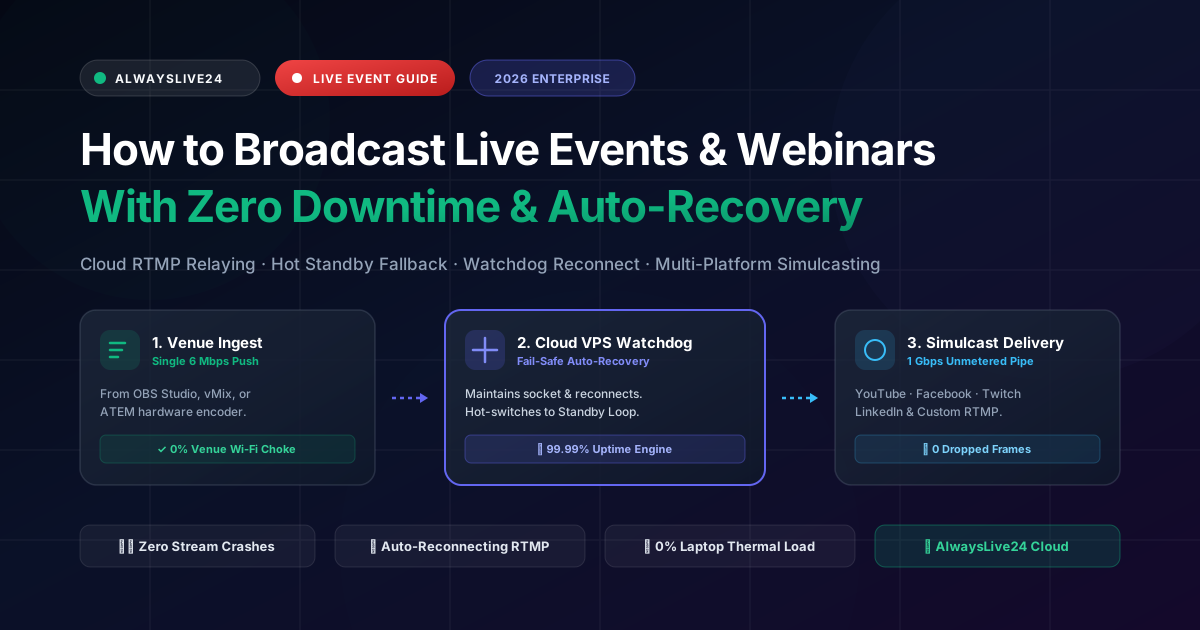
Few technical failures are more publicly devastating than a live stream crashing during a high-stakes corporate summit, hybrid conference, product launch, charity gala, or high-ticket webinar. When thousands of live attendees across YouTube Live, Facebook Live, and LinkedIn Events suddenly see a buffering spinner or an abrupt "Live stream ended by creator" banner, viewer trust evaporates within seconds, chat rooms erupt with complaints, and lead conversion plummets.
The root cause is rarely the cameras or microphones—it is the fragile architecture of streaming directly from a venue laptop over congested hotel Wi-Fi or unpredictable mobile hotspots. In 2026, leading event live streaming services and top broadcast engineers no longer push video directly to end platforms. Instead, they decouple local production from public delivery using cloud RTMP relaying, automated watchdog supervisors, and standby emergency loops. With AlwaysLive24, your broadcast maintains 100% viewer uptime even if venue Wi-Fi disconnects completely.
1 The Anatomy of Live Event Stream Failures (Why Direct Encoders Crash)
When broadcasting corporate webinars or real-time stage events, traditional setups rely on a single laptop running OBS Studio or vMix connected directly to platform RTMP endpoints. This introduces multiple critical single points of failure (SPOF):
Venue Network Buffer Bloat
Hotel and convention hall Wi-Fi often suffers severe bandwidth throttling when hundreds of attendees join the network, causing outbound RTMP packets to queue, drop, and disconnect.
Encoder Thermal Throttling
Encoding 1080p60 video for 4 to 8 hours continuously on a portable computer leads to intense CPU/GPU heat, dropped encoder frames, audio-video desync, or complete operating system freezes.
Platform Socket Termination
If YouTube or Facebook detects an ingest signal loss exceeding 15 to 30 seconds, their ingest servers permanently terminate the broadcast. The URL becomes inactive and all live viewers are lost.
| Broadcast Dimension | Direct Local Stream (OBS / vMix) | AlwaysLive24 Cloud Failover |
|---|---|---|
| Venue Bandwidth Load | Multiplied: 6 Mbps per platform (30 Mbps for 5 platforms) | Single 6 Mbps push; Cloud splits streams unmetered |
| Network Dropout Impact | Fatal: Stream ends, URL resets, viewers disconnected | Zero impact: Cloud holds socket open & plays backup loop |
| Hardware & Laptop Strain | High: 85–100% CPU/GPU, thermal throttling risks | Minimal: Laptop only sends 1 raw feed, 0% multi-encoding |
| Auto-Recovery Engine | Manual restart required; operator must re-enter keys | Automated: 5s Watchdog reconnects with exponential backoff |
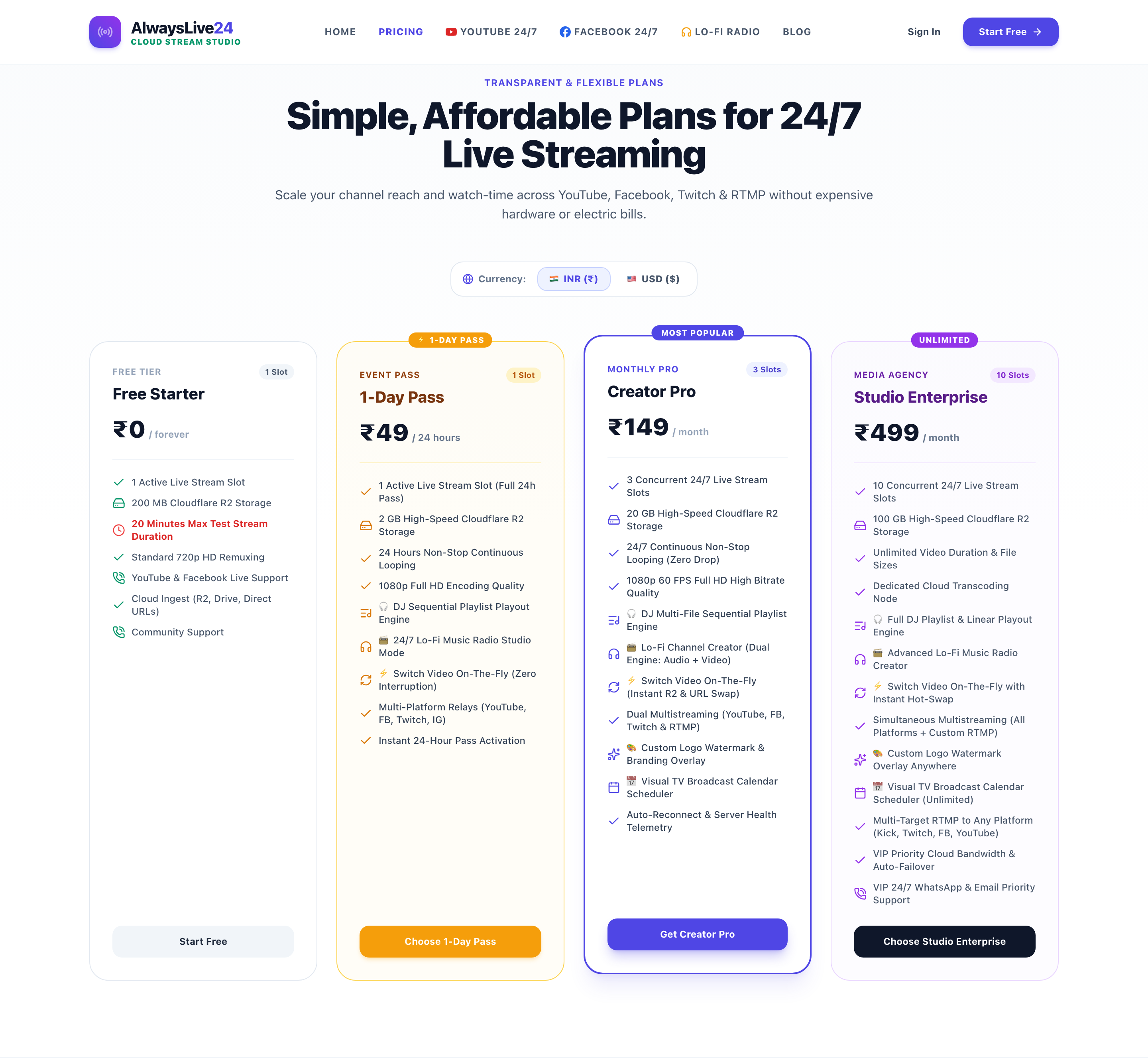
| Cost per Event | Expensive enterprise bonding boxes ($500–$2,000/day) | ₹49 ($1.99) Day Pass or ₹149 ($9.99/mo) Creator Pro |
2 High-Availability Architecture for Zero-Downtime Events
The secret behind uninterrupted corporate event streaming is socket decoupling. Rather than broadcasting directly to YouTube or social networks, your local equipment sends a single clean RTMP stream to an isolated AlwaysLive24 Cloud VPS container. The cloud engine then acts as an intelligent proxy, watchdog supervisor, and multi-destination broadcaster:
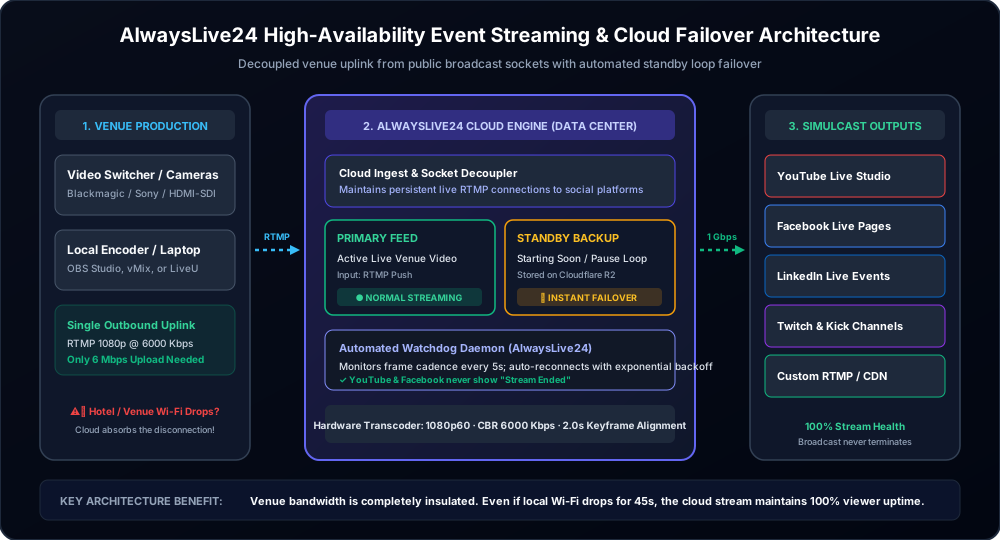
This decoupled design provides three impenetrable defense layers for event producers:
- Persistent RTMP Sockets: The outgoing broadcast connections to YouTube, Facebook, LinkedIn, and Twitch are managed exclusively by AlwaysLive24's cloud data centers (featuring 1 Gbps unmetered uplinks). Even if your venue router reboots, the public platforms experience zero socket drops.
- Standby Emergency Loop / "Starting Soon" Slate: You can upload a high-resolution standby video or branded "Session Will Resume Shortly" loop to your AlwaysLive24 cloud vault. If the live venue feed drops, the cloud switcher smoothly transitions to the standby loop without black screens.
- Automated Watchdog Auto-Recovery: The background supervisor continuously polls stream health every 5 seconds. If packet loss or frame jitter is detected, it automatically reconnects using persistent retry logic (
-reconnect 1 -reconnect_at_eof 1).
3 Step-by-Step Guide: Setting Up a Zero-Downtime Event Stream
Follow this battle-tested step-by-step workflow to prepare and broadcast any live event, conference, or webinar with 100% cloud protection:
Upload Your Standby Emergency Loop & "Starting Soon" Asset
Log in to your AlwaysLive24 Dashboard and upload your 1080p pre-event slate, countdown timer, or emergency standby video into your cloud storage. This file serves as your automated safety net before the keynote begins and during any venue technical intermissions.
Configure Your Venue Encoder (OBS Studio, vMix, or Hardware Box)
In your local broadcast software, set your output mode to Custom RTMP. Enter your designated AlwaysLive24 cloud ingest URL and unique stream key. Configure your video encoder strictly to Constant Bitrate (CBR) at 5,000–6,000 Kbps with a strict 2.0-second Keyframe Interval (see technical settings table below).
Connect Multi-Destination RTMP Outputs (Simulcasting)
In the AlwaysLive24 Stream Creation Studio, paste your public destination keys: your primary YouTube Studio live stream key, your Facebook Live Page RTMP endpoint, LinkedIn Live stream key, Twitch, and Kick. Because all replication occurs inside AlwaysLive24's cloud network, you can stream to 5 platforms simultaneously without using any additional venue upload bandwidth!

Launch with 100% Cloud Health & Watchdog Telemetry
Click "Start Live Broadcast". Your AlwaysLive24 cloud slot initializes within 3 seconds, connects to all public destinations, and starts monitoring real-time telemetry. The dashboard displays real-time FPS (30 or 60), exact bitrate, cloud health status (100% Online), and active watchdog auto-recovery status.

4 Optimal Encoding Specifications for High-Stakes Events (2026 Standards)
To ensure pristine visual clarity and prevent buffering across mobile networks, follow these industry-standard encoding specifications calibrated specifically for RTMP cloud relaying:
| Parameter | Recommended Setting | Engineering Rationale |
|---|---|---|
| Video Resolution | 1920x1080 (1080p) | Standard for keynote slides, text legibility, and full HD presentation clarity. |
| Frame Rate | 30 FPS or 60 FPS | 30 FPS is ideal for talking heads/slides (saves 40% bitrate); 60 FPS for fast motion/sports. |
| Rate Control | CBR (Constant Bitrate) | Strictly mandatory. Never use VBR for live streaming; VBR causes buffer stalls during slide transitions. |
| Video Bitrate | 4,500 – 6,000 Kbps | Provides crisp H.264 high-profile rendition without exceeding platform ingestion sweet spots. |
| Keyframe Interval | Strictly 2.0 Seconds (GOP=60) | Universal compatibility across YouTube, Facebook, Twitch, and LinkedIn ingest servers. |
| Audio Codec & Sample Rate | AAC-LC, 160–192 Kbps, 44.1 kHz | 44.1 kHz prevents FLV timestamp drift; 192 Kbps delivers studio-grade microphone clarity. |
Broadcast Engineer Pro-Tip: The "Hot-Swap" Feature
Need to play a pre-recorded sponsor video, customer testimonial, or award nominee reel during your live event? With AlwaysLive24's Hot Video Switcher, you do not need to switch inputs on your local switcher or risk lag. You can seamlessly inject a pre-uploaded video into the live broadcast directly from your cloud dashboard with a single click.
5 Simulcasting to 5+ Platforms Without Venue Bandwidth Choke
Modern corporate events and product webinars cannot afford to broadcast to only a single channel. Executives expect the live keynote to appear simultaneously on:
- YouTube Live (for high-resolution archiving, search visibility, and smart TV viewing)
- LinkedIn Live Events (for B2B professional networking and corporate lead generation)
- Facebook Live Pages & Groups (for community discussions and mobile social discovery)
- Twitch & Kick (for interactive community Q&A and developer audiences)
- Custom RTMP / Internal Company Intranets (for private employee portals)
Broadcasting to all 5 channels directly from your local encoder requires 6 Mbps × 5 = 30 Mbps of dedicated, uninterrupted outbound upload speed. In a crowded hotel or convention center, obtaining 30 Mbps of dedicated upstream bandwidth can cost upwards of $1,000 per day.
With AlwaysLive24's Cloud Multi-RTMP Multiplexing, your local laptop or hardware encoder sends only one single 6 Mbps feed. AlwaysLive24's European cloud servers duplicate the feed at wire speed across unmetered 1 Gbps fiber pipes, delivering flawless 1080p feeds to all 5 platforms simultaneously with zero added strain on your venue connection.
6 Commercial Comparison: Enterprise Event Agencies vs. AlwaysLive24
Before cloud broadcasting platforms existed, corporate event producers had to hire dedicated AV transmission crews charging thousands of dollars per day for cellular bonding backpacks and satellite uplink trucks:
| Solution Provider | Typical Pricing | Hardware Needed | Auto-Recovery & Failover |
|---|---|---|---|
| Traditional AV Event Agency | $1,500 – $5,000 / event | Heavy flight cases, SDI routers, crew | Manual switcher operator |
| Cellular Bonding Hardware | $800 – $1,200 / rental | Physical modem backpacks + SIM plans | Network bonding only; no loop standby |
| Standard Restreamers | $39 – $99 / month | Local PC (Must keep laptop on) | No automated backup loop if PC disconnects |
| AlwaysLive24 Cloud Studio | ₹49 ($1.99) Day Pass / ₹149/mo | Zero hardware; 100% Cloud VPS | Instant hot standby loop + Watchdog |
7 Frequently Asked Questions (FAQ)
What happens if the hotel Wi-Fi disconnects completely for 30 seconds?
With AlwaysLive24, the public live stream on YouTube and Facebook remains 100% active. The cloud engine detects the missing local frames and automatically loops your standby "Technical Intermission / Event Resumes Shortly" slate while keeping the platform RTMP socket alive. Once your venue connection recovers, the live stage video resumes instantly without the stream ever ending.
Can I broadcast a pre-recorded keynote as if it were a live event?
Yes! Many webinar producers prefer to pre-record their keynotes in pristine 4K/1080p studio conditions, upload the MP4 file to AlwaysLive24, and broadcast it as a "Live Event" on YouTube and Facebook. This guarantees flawless presentation delivery while the speaker interacts live with attendees in the chat room.
Does cloud relaying add latency to my live stream?
The relay overhead added by AlwaysLive24's European cloud network is typically less than 300 to 500 milliseconds. When combined with YouTube's Ultra-Low Latency or Low Latency streaming modes, your total glass-to-glass delay remains under 3 to 5 seconds—perfect for real-time audience Q&A and live polling.
Can I stream to Zoom or Microsoft Teams webinars via RTMP?
Yes. If your Zoom or Teams account has RTMP / Live Streaming integration enabled, you can copy the RTMP ingestion URL and stream key into AlwaysLive24 to broadcast your high-definition production directly into virtual webinar rooms alongside YouTube and Facebook.
Do I need to keep my laptop open once the event stream starts?
If you are broadcasting a pre-recorded webinar or video playlist, you can turn off your laptop and shut down completely. If you are relaying a live camera feed from the venue, your local encoder pushes the feed to the cloud, but you never have to worry about local transcoding or multi-destination bandwidth multiplication.
Never Risk a Live Stream Disaster Again
Broadcast corporate events, summits, webinars, and church services with 100% cloud reliability, automated failover, and zero venue Wi-Fi chokepoints.