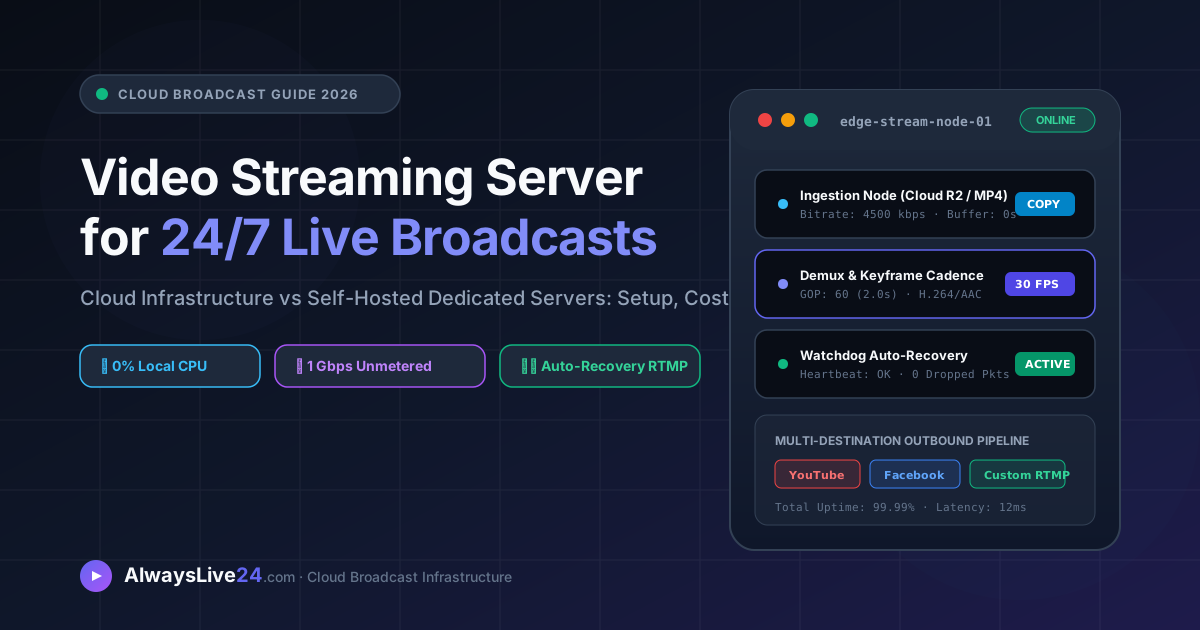
Running a non-stop, continuous live stream on YouTube, Facebook, Twitch, or custom RTMP destinations requires a dedicated video streaming server capable of broadcasting 24 hours a day, 365 days a year without dropped frames, overheating laptops, or residential internet dropouts. In this comprehensive technical guide, we evaluate the reality of building a self-hosted video streaming server (using AWS EC2, DigitalOcean, Nginx-RTMP, and FFmpeg) versus deploying a turnkey managed cloud broadcast server like AlwaysLive24.
Table of Contents
- Why Creators & TV Broadcasters Need a Video Streaming Server
- How a Cloud Video Streaming Server Operates (Behind the Scenes)
- Option A: Building a Self-Hosted Server (AWS, Nginx-RTMP & Cost Traps)
- Option B: Turnkey Managed Cloud Streaming Server (AlwaysLive24)
- Visual Architecture Deep Dive: Self-Hosted vs Managed Cloud Server
- Real-World Cost & Performance Breakdown (AWS vs AlwaysLive24)
- Step-by-Step: Launching a 24/7 Cloud Video Streaming Server in 3 Minutes
- Key Enterprise Capabilities: 0% CPU Direct Copy & Hot Video Switcher
- Frequently Asked Questions (FAQ)
1 Why Creators & TV Broadcasters Need a Video Streaming Server
For ordinary 1-hour live gaming sessions or casual webcam chats, broadcasting directly from a desktop PC using open-source tools like OBS Studio works acceptably. However, when transitioning to commercial-grade broadcasting—such as running 24/7 looped YouTube live streams, continuous Lo-Fi music radio stations, devotional chant channels, or 24/7 internet TV networks—local computers inevitably fail for three structural reasons:
Hardware Exhaustion
Continuous video encoding pushes local GPUs/CPUs to 90°C+ thermal limits, shortening laptop lifespans and consuming hundreds of kilowatt-hours in electricity.
Residential Network Flaws
Home Wi-Fi and ISP connections suffer from jitter, packet drops, and dynamic IP resets. A 5-second ISP blackout causes YouTube to terminate the live broadcast permanently.
Required PC Uptime
Local streaming binds your machine 24/7. You cannot shut down, reboot for OS updates, or close your laptop lid without instantly killing your audience feed.
A dedicated video streaming server completely solves these vulnerabilities by transferring 100% of the stream generation, media storage, and packet delivery to resilient data-center servers connected to high-bandwidth optical tier-1 internet backbones.
2 How a Cloud Video Streaming Server Operates (Behind the Scenes)
At its technical core, a video streaming server performs continuous multimedia ingestion, demuxing, pacing, and egress encapsulation. Here is the operational sequence executed by AlwaysLive24's cloud cluster:
// AlwaysLive24 Cloud Server Real-Time Pipeline
[1. Cloud Storage Ingestion] → Cloudflare R2 Global Edge Vault (Zero latency MP4 fetching)
[2. Hardware-Free Remuxer] → Direct Stream Copy (H.264 video + AAC audio preserved with 0% CPU loss)
[3. Precise Cadence Generator] → Native Clock Pacing (fps=30.00, GOP=60 frames / 2.0s strict keyframes)
[4. Multi-RTMP Muxer] → Simultaneous broadcast to YouTube, Facebook, Twitch & Custom RTMP
[5. Watchdog Auto-Failover] → Real-time PID & bitrate telemetry check every 5,000ms with auto-reconnect
Because the media file is hosted directly in enterprise cloud storage and streamed from our data-center containers directly to YouTube’s ingestion servers (rtmp://a.rtmp.youtube.com/live2), your personal computer, smartphone, or tablet can be turned completely off.
3 Option A: Building a Self-Hosted Server (AWS, Nginx-RTMP & Cost Traps)
Many developers and technical streamers initially attempt to set up their own virtual private server (VPS) using cloud providers like Amazon Web Services (AWS EC2), DigitalOcean Droplets, or Linode.
To build a self-hosted streaming server, you typically must execute the following complex DevOps process:
- Provision a Linux VPS Instance: Spin up an Ubuntu 24.04 LTS instance with at least 2 vCPUs and 4 GB RAM (such as an AWS
t3.mediumor DigitalOcean $24/mo droplet). - Compile Nginx with RTMP Module: Download Nginx source code, compile the
nginx-rtmp-module, and write customnginx.confrouting blocks. - Write Daemonized FFmpeg Loop Scripts: Write bash or Python daemons using
ffmpeg -re -stream_loop -1 -i input.mp4 -c copy -f flv rtmp://...and configuresystemdservices for auto-restart. - Handle SSH Disconnects & Zombie Processes: Manage orphan FFmpeg processes, monitor memory leaks, and manually SSH into the server whenever YouTube resets its RTMP handshake.
A single 1080p 24/7 live stream running at 4,500 kbps outputs approximately 1.46 Terabytes (1,460 GB) of data per month. On AWS EC2 or Google Cloud Platform (GCP), outbound data egress is billed at approximately $0.09 per Gigabyte. That means streaming one 24/7 channel on AWS will cost you over $130.00/month in bandwidth fees alone, entirely separate from your EC2 compute instance bill!
4 Option B: Turnkey Managed Cloud Streaming Server (AlwaysLive24)
AlwaysLive24 was engineered specifically to eliminate all server maintenance, command-line scripting, and predatory bandwidth billing.
Instead of renting a blank Linux terminal and paying hundreds of dollars in data transfer fees, AlwaysLive24 provides an isolated, production-grade cloud broadcast node equipped with:
- 100% Unmetered 1 Gbps Cloud Bandwidth: Stream 24 hours a day, 30 days a month with zero extra data usage charges, hidden overage fees, or throttling.
- Intuitive Web Mission Control: Start, pause, kill, or preview your live broadcast from any web browser on your phone, Mac, Windows, or Linux device.
- Hot-Swap Video Switcher: Change your broadcast video on-the-fly while your stream remains live on YouTube with zero downtime.
- Multi-Target Broadcasting: Stream to YouTube, Facebook Live, Twitch, and Kick simultaneously without paying extra for separate restreaming services.
- Transparent Pricing: Plans start at just ₹49 ($1.99) for a 24-hour Day Pass or ₹149/month ($9.99/mo) for Creator Pro with 3 live stream slots and 20 GB Cloudflare R2 storage.
5 Visual Architecture Deep Dive: Self-Hosted vs Managed Cloud Server
The architecture diagram below highlights the structural contrast between maintaining a brittle self-hosted cloud server versus deploying an AlwaysLive24 automated node:
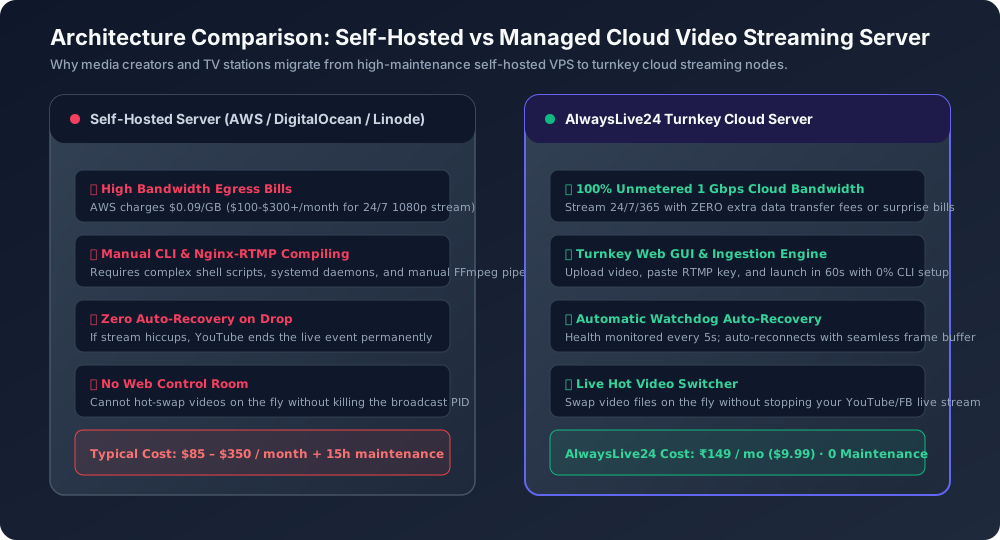
Figure 1: Comparison between self-hosted cloud instances (fragile scripts, high egress billing) versus AlwaysLive24 automated broadcast clusters.
6 Real-World Cost & Performance Breakdown (AWS vs AlwaysLive24)
Here is the realistic financial and operational comparison for broadcasting a single 24/7 1080p live stream over a 30-day billing cycle:
| Feature / Metric | Self-Hosted AWS EC2 | DigitalOcean Droplet | AlwaysLive24 Creator Pro |
|---|---|---|---|
| Base Compute Cost | $30.00 / mo (t3.medium) | $24.00 / mo (2 vCPU/4GB) | ₹149 / mo ($9.99/mo) |
| Bandwidth Cost (1.4 TB) | ~$131.00 ($0.09/GB) | ~$14.00 (Overage) | ₹0 (100% Unmetered) |
| Web Control Dashboard | None (Terminal CLI only) | None (Terminal CLI only) | Modern Web Studio GUI |
| Simultaneous Live Slots | 1 (Severely CPU throttled) | 1 (High load) | 3 Simultaneous Slots |
| Auto-Recovery Watchdog | Manual cron scripting | Manual cron scripting | Automated 5s Heartbeat |
| Video Storage Vault | AWS S3 (extra $5-$15/mo) | DO Spaces ($5/mo) | 20 GB Cloudflare R2 Included |
| Total Monthly Cost | $165.00+ / mo | $43.00+ / mo | ₹149 / mo ($9.99/mo) |
7 Step-by-Step: Launching a 24/7 Cloud Video Streaming Server in 3 Minutes
Getting your 24/7 video streaming server online with AlwaysLive24 takes under 3 minutes with zero technical setup:
1 Upload or Select Your Video Media
In your AlwaysLive24 dashboard, click "Create Stream". Choose your video source: upload directly to your high-speed Cloudflare R2 storage, choose an existing video from your library, or paste a direct MP4/M3U8 link from any storage bucket.
2 Input Your Destination RTMP URL & Stream Key
Select your streaming platform (YouTube Live, Facebook Live, Twitch, Kick, or Custom RTMP). Copy the Stream URL and Stream Key from your YouTube Studio or Facebook Live Producer, and paste them into the designated fields.
3 Check "Loop Stream (24/7 Infinite Loop)" & Launch
Ensure the "Loop Stream (24/7 Infinite Loop)" checkbox is checked. Click "Start Live Broadcast". Your dedicated cloud streaming node immediately initializes, establishes the RTMP handshake with YouTube, and streams continuously!
8 Key Enterprise Capabilities: 0% CPU Direct Copy & Hot Video Switcher
Unlike traditional streaming software that re-encodes video pixels redundantly (burning CPU power), AlwaysLive24 uses proprietary intelligent pipeline optimizations:
⚡ 0% CPU Direct Stream Copy
When your uploaded video is already compliant with standard broadcast codecs (H.264 video with AAC audio), our engine bypasses re-encoding entirely. It extracts native video frames and demuxes them directly into the RTMP output container, preserving 100% original visual fidelity with pristine 60 FPS clarity and negligible latency.
🔄 Live Hot-Swap Video Switcher
Need to switch to a breaking news update, a new podcast episode, or a fresh DJ track? With AlwaysLive24's Hot Video Switcher, you can swap the playing video on-the-fly directly inside the control room without disconnecting the live stream from YouTube. Your viewers never experience a buffering screen.
9 Frequently Asked Questions (FAQ)
Can I close my laptop or turn off my PC while streaming?
Yes, absolutely. Your live stream is hosted and executed 100% on AlwaysLive24's high-speed cloud servers. Once you click "Start Live Broadcast", you can completely turn off your computer, sleep, disconnect your internet, or travel. Your stream will continue broadcasting 24/7/365 uninterrupted.
How is AlwaysLive24 so much cheaper than AWS or Restream?
Traditional cloud providers (AWS, GCP, Azure) enforce heavy data transfer markups ($0.09/GB) because they are designed for enterprise databases rather than video delivery. AlwaysLive24 utilizes high-density bare-metal multi-core infrastructure paired with enterprise Cloudflare R2 storage, allowing us to deliver 1 Gbps unmetered bandwidth at wholesale costs—passing 80%+ savings directly to creators.
Does YouTube penalize 24/7 video streaming servers?
No. YouTube’s algorithm heavily favors 24/7 live streams because they drive massive watch time and user retention. Provided you own the rights to the broadcasted audio and video content (such as your own original podcasts, gameplay replays, tutorials, or copyright-free music), 24/7 streaming is fully compliant with YouTube’s Terms of Service and Community Guidelines.
Launch Your 24/7 Video Streaming Server in 60 Seconds
Stop wasting money on complex AWS instances and overheating laptops. Get started for free or upgrade to Creator Pro for just ₹149/month with 100% unmetered bandwidth.