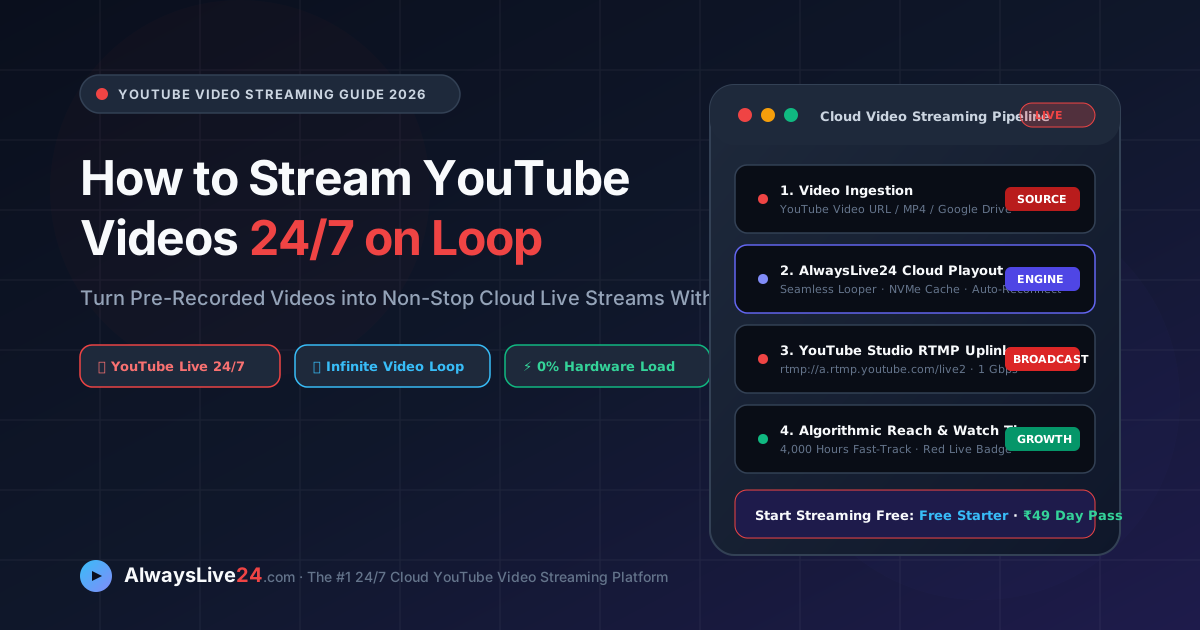
Have you ever wondered how leading digital creators, ambient music labels, and media broadcasters run non-stop youtube video streaming channels 24 hours a day, 7 days a week? Instead of sitting in front of a camera all day, smart creators take their highest-performing pre-recorded content and stream youtube video files on a continuous, automated loop. By maintaining an active online stream, your channel unlocks YouTube's massive algorithmic preference for live content—generating continuous watch hours, boosting subscriber growth, and earning Super Chat donations on autopilot. In this definitive 2026 masterclass, we explain how to launch your own 24/7 YouTube live loop from the cloud using AlwaysLive24 with zero local hardware and zero dropped frames.
Table of Contents — 24/7 YouTube Video Streaming Guide
- 01. Why Streaming YouTube Videos 24/7 Skyrockets Growth
- 02. OBS Studio vs Cloud Video Playout
- 03. Cloud Workflow & Playout Pipeline
- 04. Step-by-Step: Launch Your YouTube Stream in 60s
- 05. Zero-Disk Streaming: YouTube Links & Drive
- 06. YouTube Live SEO & Algorithmic Ranking Tips
- 07. Platform Rules & Copyright Safety
- 08. Cloud Streaming Comparison & Pricing
- 09. Frequently Asked Questions (FAQ)
- 10. Start Streaming on YouTube Today
1. Why Streaming YouTube Videos 24/7 Skyrockets Channel Growth
YouTube is the second largest search engine in the world, processing over 3 billion searches every month. However, standard on-demand video uploads face intense competition. When you publish a standard MP4 video, it relies entirely on YouTube's browse features and click-through rates (CTR) during the first 48 hours.
In contrast, an active online stream triggers a distinct set of viral promotional mechanisms inside YouTube's discovery algorithm:
- The Red "LIVE" Avatar Badge: Whenever your channel is live, YouTube paints a vibrant red "LIVE" ring around your channel avatar across all subscriber subscriptions, home feeds, and search result headers.
- Aggressive Recommendation Placement: YouTube actively promotes live streams in the "Live" section of user homepages, sidebar recommendations, and smart TV apps to maximize immediate viewer retention.
- Rapid Watch Time Accumulation: To qualify for the YouTube Partner Program (YPP), channels need 4,000 public watch hours. A single 24/7 stream generates 168 continuous watch hours per week per viewer, reaching the monetization threshold up to 10x faster than standard uploads.
- Continuous Community Live Chat: Viewers love participating in real-time chat, sending Super Chats, donating Super Stickers, and purchasing channel memberships while chatting with other fans around the globe.
2. The 3 Methods to Stream YouTube Videos: Local OBS vs Cloud Playout
If you want to loop a video stream on YouTube, there are three primary technical architectures creators consider. Understanding their trade-offs is essential:
| Broadcasting Factor | Method 1: Local PC (OBS Studio) | Method 2: Self-Hosted VPS | Method 3: AlwaysLive24 Cloud Playout |
|---|---|---|---|
| PC Required 24/7 | Yes (PC must never sleep) | No | No (100% cloud-hosted) |
| Monthly Cost | $40-$80/mo electric + PC wear | $30-$60/mo Linux server | ₹0 Free / ₹149 ($9.99)/mo Pro |
| Setup Complexity | Moderate (OBS media source loop) | Extremely Complex (FFmpeg, CLI) | Zero (Browser point-and-click) |
| Network Disconnects | Crashes stream on home Wi-Fi drop | Manual shell script restart | Auto-reconnects in <5s (Watchdog) |
| Bandwidth Load | 6-10 Mbps residential upload | Metered cloud bandwidth | 1 Gbps unmetered data center uplink |
Running OBS Studio on your home PC or laptop to stream 24/7 is notoriously risky. Thermal throttling, automated Windows updates, electrical surges, and residential broadband packet loss will inevitably crash your live stream while you sleep. Cloud playout is the proven standard adopted by professional YouTube networks.
3. Cloud Workflow & Playout Pipeline
Broadcasting a continuous live video youtube feed from the cloud requires an optimized, fault-tolerant media pipeline. AlwaysLive24 is engineered specifically to eliminate every single point of failure between your video file and YouTube's RTMP ingest servers:
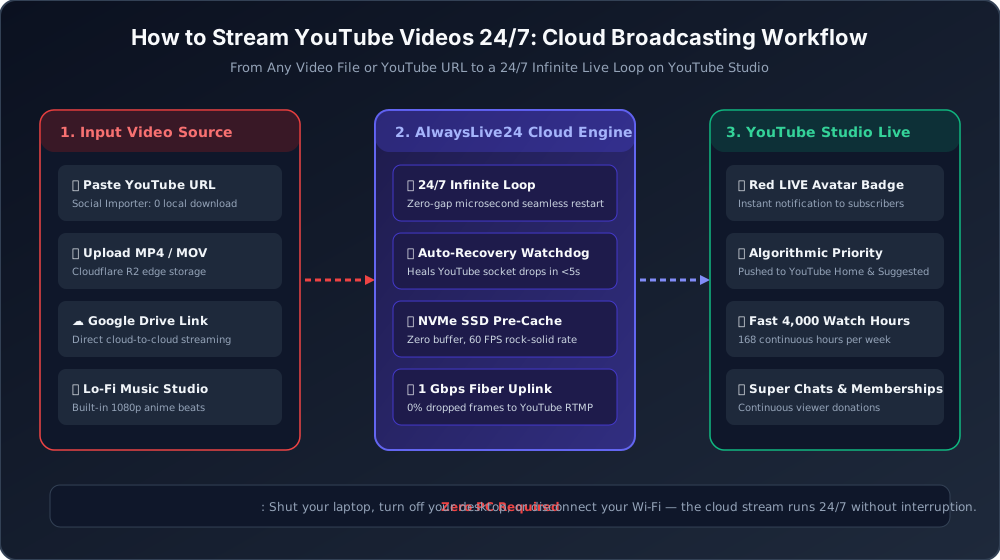
Figure 1: AlwaysLive24 Cloud Playout Architecture — Ingest, NVMe SSD Caching, 24/7 Infinite Looping, and Direct YouTube RTMP Uplink.
Key engineering capabilities behind AlwaysLive24's cloud playout engine:
- NVMe SSD Local Pre-Caching: Streaming directly over public HTTP links from third-party storage can cause buffering if an authorization token expires after 24 or 48 hours. AlwaysLive24 automatically pre-caches active video streams onto lightning-fast local NVMe SSDs, allowing seamless 365-day continuous looping without network stutters.
- Microsecond Seamless Looper: When your video reaches the final second of playback, our cloud engine restarts the timeline microsecond-fast without dropping keyframes or resetting the RTMP socket connection. To YouTube Studio, the broadcast appears as one flawless, uninterrupted feed.
- Automated Watchdog Auto-Recovery: If YouTube's ingestion servers experience a momentary TCP reset (exit code 152 or timeout code 146), our background watchdog daemon instantly re-establishes the connection in under 5 seconds, preserving your broadcast without creator intervention.
4. Step-by-Step: How to Stream Any Video to YouTube Live in 60 Seconds
Ready to broadcast your first 24/7 online live stream on YouTube? Here is the complete step-by-step tutorial:
Copy Your YouTube RTMP Stream Key
Open YouTube Studio, click Create in the top right corner, and select Go Live. Under Stream Settings, copy your Stream Key (keep it private). Ensure your stream latency is set to Normal Latency for the highest streaming stability and 1080p quality.
Select Video Source on AlwaysLive24
Log into your AlwaysLive24 dashboard and click Create Stream. You can upload an MP4/MOV file directly from your device, paste an existing YouTube video link into our Social Video Importer, or paste a public Google Drive video link.
Paste Stream Key & Enable 24/7 Infinite Loop
Select YouTube as your streaming platform, paste your Stream Key, and check the Loop Stream (24/7 Infinite Loop) box. Click Start Live Broadcast!
Shut Down Your Computer & Enjoy 24/7 Views
Within 10 seconds, YouTube Studio will display an "Excellent Connection" green indicator. You can now close your browser, turn off your computer, and let AlwaysLive24's cloud infrastructure broadcast your video round-the-clock!
Figure 2: The AlwaysLive24 Stream Creation Modal — YouTube RTMP destination, 24/7 infinite looping toggle, and instant video linking.
6. YouTube Live SEO & Algorithmic Ranking Tips
Launching a 24/7 stream is only step one; optimizing your stream metadata ensures YouTube's recommendation engine puts your broadcast in front of thousands of concurrent viewers:
- Use Persistent Stream Keys: In YouTube Studio, always select your Default Stream Key (Persistent). This ensures you can restart or hot-swap videos on AlwaysLive24 without having to create a new live event or distribute a new YouTube URL to your viewers.
- High-Contrast 1280x720 Thumbnail: Live stream thumbnails appear with a prominent red "LIVE" badge in the bottom right corner. Ensure your thumbnail text is placed in the upper-left or center, using bold, contrasting fonts that remain legible on mobile screens.
- Target Long-Tail Search Queries in Titles: Instead of generic titles like "My Live Stream", use intent-driven phrasing such as "24/7 Relaxing Lo-Fi Study Beats — Deep Focus & Sleep Music" or "Minecraft Hardcore World Tour 24/7 Non-Stop Gameplay".
- Pin an Engagement Call-to-Action in Live Chat: Pin a top message inviting viewers to subscribe, join your Discord server, or check out your affiliate links while they enjoy the live broadcast.
Figure 3: Mission Control Dashboard — Real-time 30 FPS telemetry, zero local CPU load, and continuous auto-recovery status.
7. Platform Rules & Copyright Compliance
A common question among creators is whether streaming looped pre-recorded videos violates YouTube's Terms of Service. The answer is an unequivocal No, provided you follow standard YouTube Community Guidelines:
Best Practices for 100% Monetization-Safe 24/7 Streams:
- Stream Content You Own or Have Licensed: Never stream copyrighted TV shows, movies, sports broadcasts, or commercial music without written licenses. Content ID will automatically claim or terminate the stream.
- Use Copyright-Free Music: If you are running an ambient radio or gaming stream, use copyright-free music from the YouTube Audio Library, Epidemic Sound, or AlwaysLive24's built-in royalty-free Lo-Fi music library.
- Rotate Video Playlists: If streaming a playlist of videos, use longer compilation files (1 to 4 hours) before looping to give viewers a fresh, engaging viewing experience throughout the day.
8. Cloud Streaming Comparison & Pricing
Unlike traditional platforms that charge $39 to $89 per month for limited pre-recorded broadcasting, AlwaysLive24 was created to offer world-class cloud streaming at transparent, creator-friendly prices:
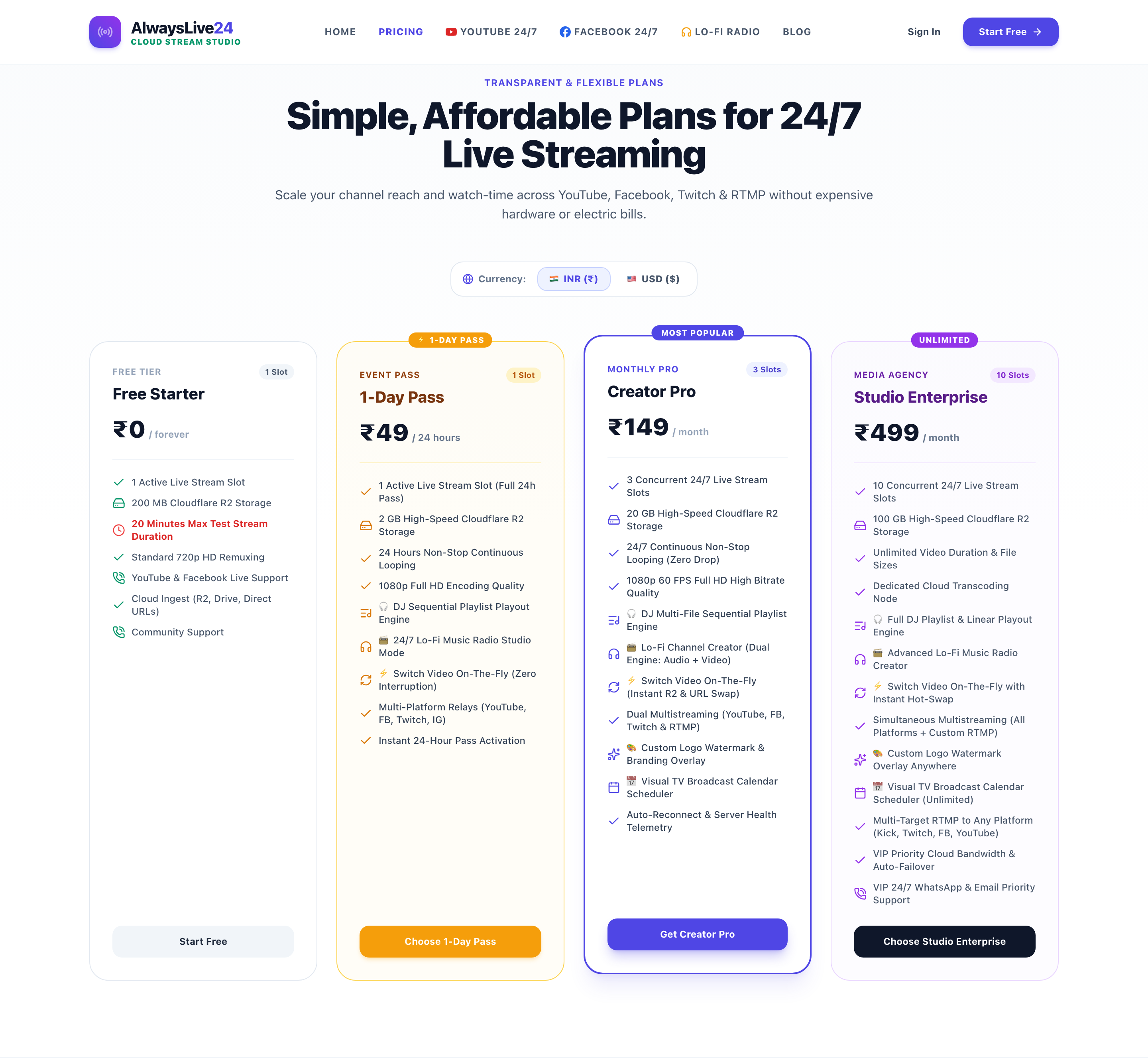
Figure 4: AlwaysLive24 Pricing Plans — Free Starter (₹0), 24-Hour Day Pass (₹49 / $1.99), and Creator Pro (₹149 / $9.99/mo) with unmetered 1 Gbps bandwidth.
9. Frequently Asked Questions About YouTube Video Streaming
Can I live stream an existing YouTube video from my channel?
Yes! Simply copy the URL of your existing YouTube video, paste it into AlwaysLive24's Social Video Importer, and click Start. Our cloud servers stream the video directly to YouTube Live on an infinite loop without requiring you to download or re-upload the file.
Does the stream stop if my internet goes out?
No! Once the stream is launched on AlwaysLive24, the entire broadcast runs on high-speed cloud servers with 1 Gbps fiber uplinks. Your home internet, Wi-Fi status, or laptop battery level have zero impact on the live stream.
Can I stream to Twitch and Facebook at the same time?
Yes! AlwaysLive24 includes native Multi-RTMP capabilities. You can broadcast your video simultaneously to YouTube Live, Twitch, Facebook Live, and Kick without multiplying your bandwidth or CPU consumption.
Can I hot-swap the video playing on my live stream?
Yes. With AlwaysLive24's Hot Video Switcher, you can switch the active playing video right from your dashboard without stopping the stream or changing your YouTube broadcast URL.
Start Streaming Your YouTube Videos 24/7
Turn your pre-recorded videos into continuous algorithmic growth. Launch your first 24/7 cloud live stream with AlwaysLive24 today — zero hardware, unmetered bandwidth, and 100% watermark free on all plans.
Plans from ₹49 ($1.99) Day Pass · ₹149 ($9.99)/mo Creator Pro · 24/7 Automated Reconnection
5. Zero-Disk Streaming: Stream Directly from YouTube Links & Google Drive
One of AlwaysLive24's most loved features is Zero-Disk Streaming. Traditional platforms force you to download massive 10GB-50GB video files to your computer, wait hours for files to transfer, and then re-upload them to a streaming server.
With AlwaysLive24, you can bypass local downloads entirely using two powerful options:
Paste any existing YouTube video link into AlwaysLive24. Our cloud engines resolve the media stream in seconds without consuming any local disk space on your laptop or smartphone.
Store your long 10-hour ambient sounds, gaming playthroughs, or educational lectures on Google Drive. Paste the share link, and AlwaysLive24 streams it directly with enterprise reliability.