Facebook Live remains one of the most powerful, underutilized organic distribution channels on the internet in 2026. Meta's discovery algorithm aggressively prioritizes live video over standard uploads—delivering up to 3x longer watch times and generating over 10x more comments and shares. Whenever a Facebook Page or Group goes live, push notifications are instantly dispatched to followers' mobile devices and desktop feeds.
However, scaling a consistent live broadcast schedule on Facebook is historically exhausting. Traditional live streaming software like OBS Studio or Streamlabs forces creators to keep a high-power desktop PC running non-stop. If your home Wi-Fi drops for 3 seconds, your power flickers, or your computer enters sleep mode, your Facebook Live broadcast abruptly cuts off—resetting your viewer count and destroying your algorithmic momentum.
The 2026 Cloud Playout Advantage
With AlwaysLive24 Cloud Playout, you can broadcast pre-recorded MP4/MOV videos on an infinite 24/7 loop directly to any Facebook Page or Group. Your stream is powered entirely by high-performance cloud data centers with 1 Gbps unmetered bandwidth. Once you start your stream, you can completely shut down your laptop, turn off your monitors, and go to sleep while your Facebook broadcast runs non-stop.
Why Stream Pre-Recorded Videos on Facebook Live?
Publishing pre-recorded videos as 24/7 Facebook Live broadcasts unlocks exponential organic reach compared to static page posts:
- Top Feed Placement: Facebook prioritizes active live broadcasts with dedicated "LIVE" badges at the very top of users' newsfeeds and video recommendations.
- Instant Follower Notifications: Active followers receive real-time push alerts saying "Your Page is Live Now", driving immediate organic click-throughs.
- Zero Host Burnout: You don't need to sit in front of a camera for 8 hours every day. Broadcast high-production webinars, gameplay walkthroughs, Lo-Fi music, or product demonstrations while you focus on business operations.
- Facebook Group Community Engagement: Broadcasting inside private or public Facebook Groups creates communal watch parties where members interact via live chat.
Step 1: Get Your RTMPS Server URL & Persistent Stream Key from Meta Live Producer
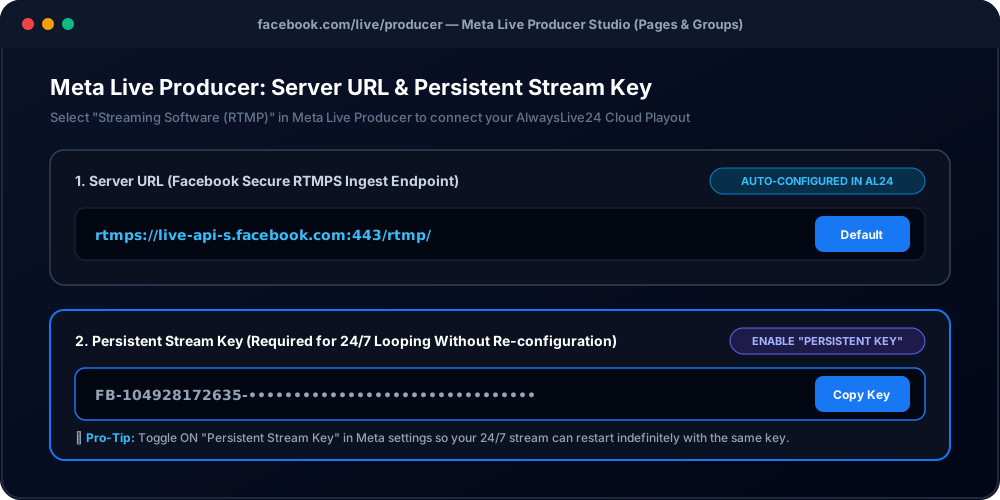
Meta provides a dedicated live broadcasting dashboard called Live Producer. This is where you locate the secure RTMPS stream endpoint and authentication key needed to connect your cloud stream.
- Open your desktop browser and navigate to facebook.com/live/producer.
- Under "Select where to post", choose your target destination:
- Post to Page you manage: Select the specific Facebook business page or creator page.
- Post in Group: Select the Facebook Group where you have admin or moderator permissions.
- Under "Select a video source", click on Streaming software.
- Navigate to the Stream setup section on the left sidebar:
- Server URL: Meta's default secure RTMPS endpoint is
rtmps://live-api-s.facebook.com:443/rtmp/. AlwaysLive24 automatically configures this endpoint for you. - Stream Key: This is your unique secret broadcast token formatted like
FB-104928172635-xxxxxxxxxxxx.
- Server URL: Meta's default secure RTMPS endpoint is
Crucial Setting: Enable "Persistent Stream Key"
By default, Facebook generates a temporary stream key that expires after 7 days. Under Meta Live Producer settings, click "Stream settings" and toggle ON "Persistent stream key". This ensures your stream key remains permanent, allowing your 24/7 infinite loop to broadcast continuously without ever requiring manual re-configuration!
Step 2: Connect Facebook Live in AlwaysLive24 Cloud Playout
Once you have copied your Persistent Stream Key from Meta Live Producer, setting up your 24/7 broadcast in AlwaysLive24 takes under 60 seconds:
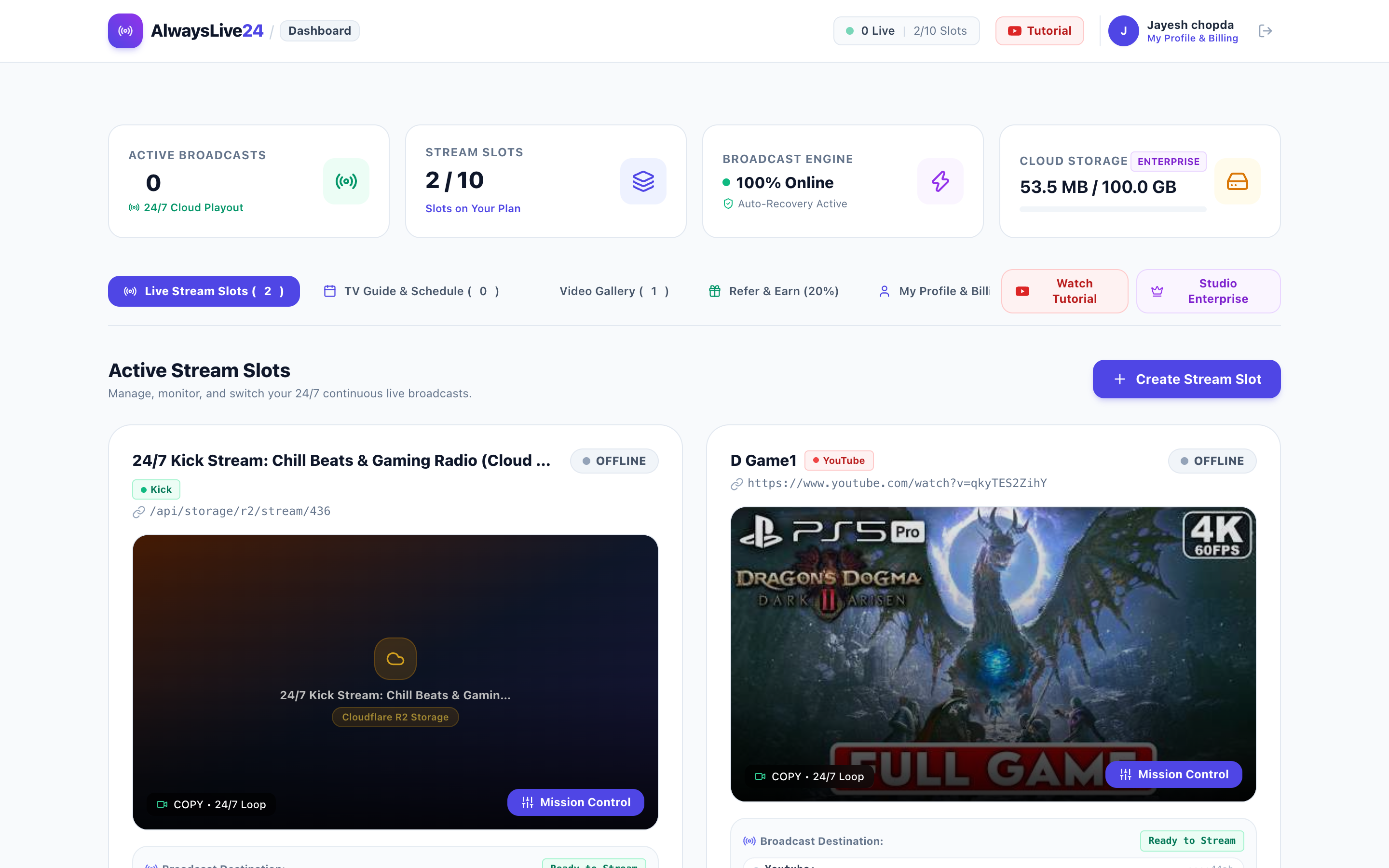
- Log into your AlwaysLive24 Dashboard and click the "+ Create Stream" button.
- Select Video Source (Step 1):
- Paste a public Google Drive video URL, YouTube link, or select a previously uploaded file from your Cloudflare R2 gallery.
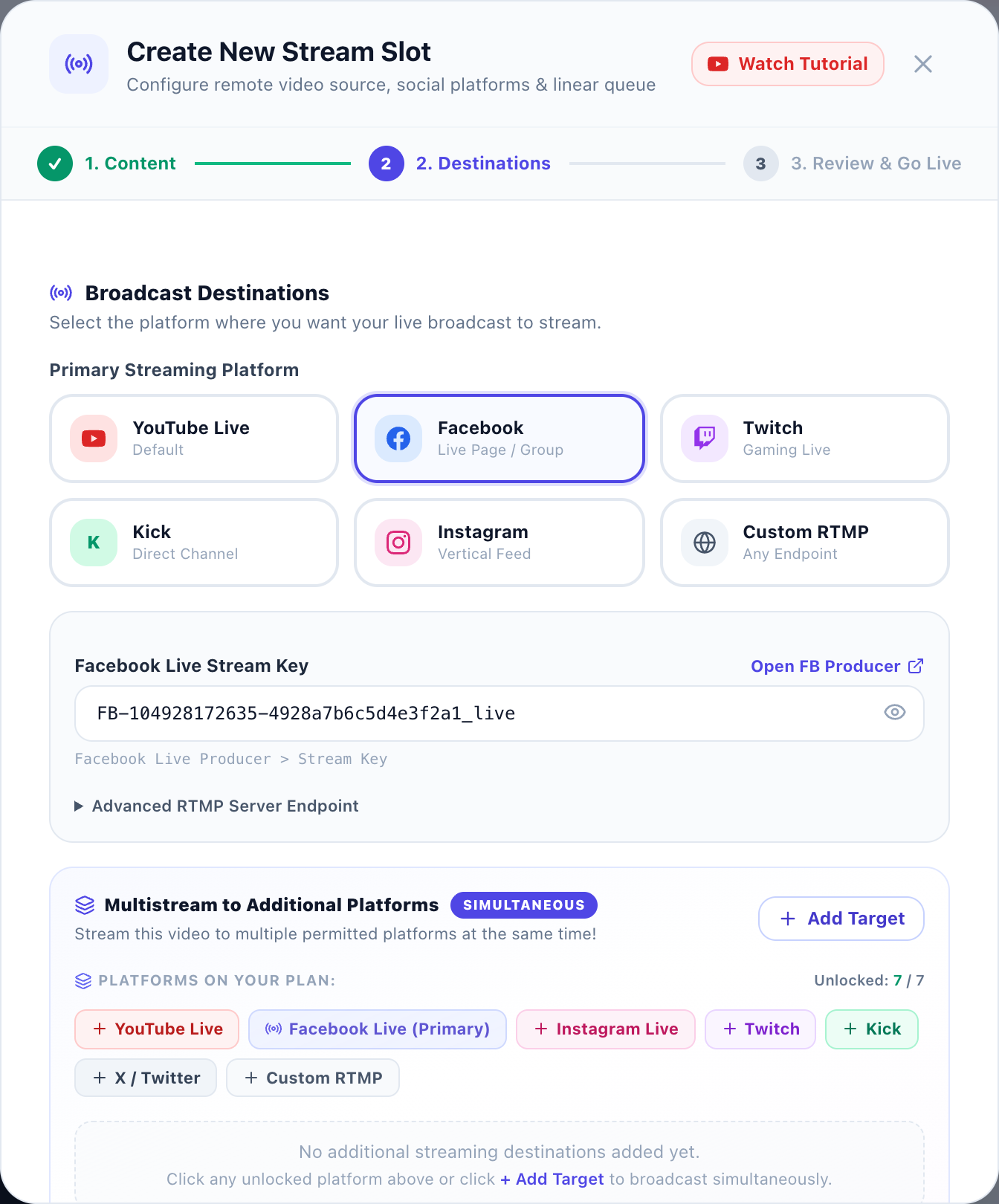
- Select Platform & Paste Stream Key (Step 2):
- Click on the Facebook platform card.
- AlwaysLive24 automatically populates the official Facebook RTMPS Server URL (
rtmps://live-api-s.facebook.com:443/rtmp/). - Paste your Persistent Stream Key into the Stream Key field.
- Optional: Enable Custom Logo / Watermark Overlay to position your brand logo anywhere on the screen (Top-Left, Top-Right, etc.).
Step 3: Enable 24/7 Infinite Loop & Review Launch Settings
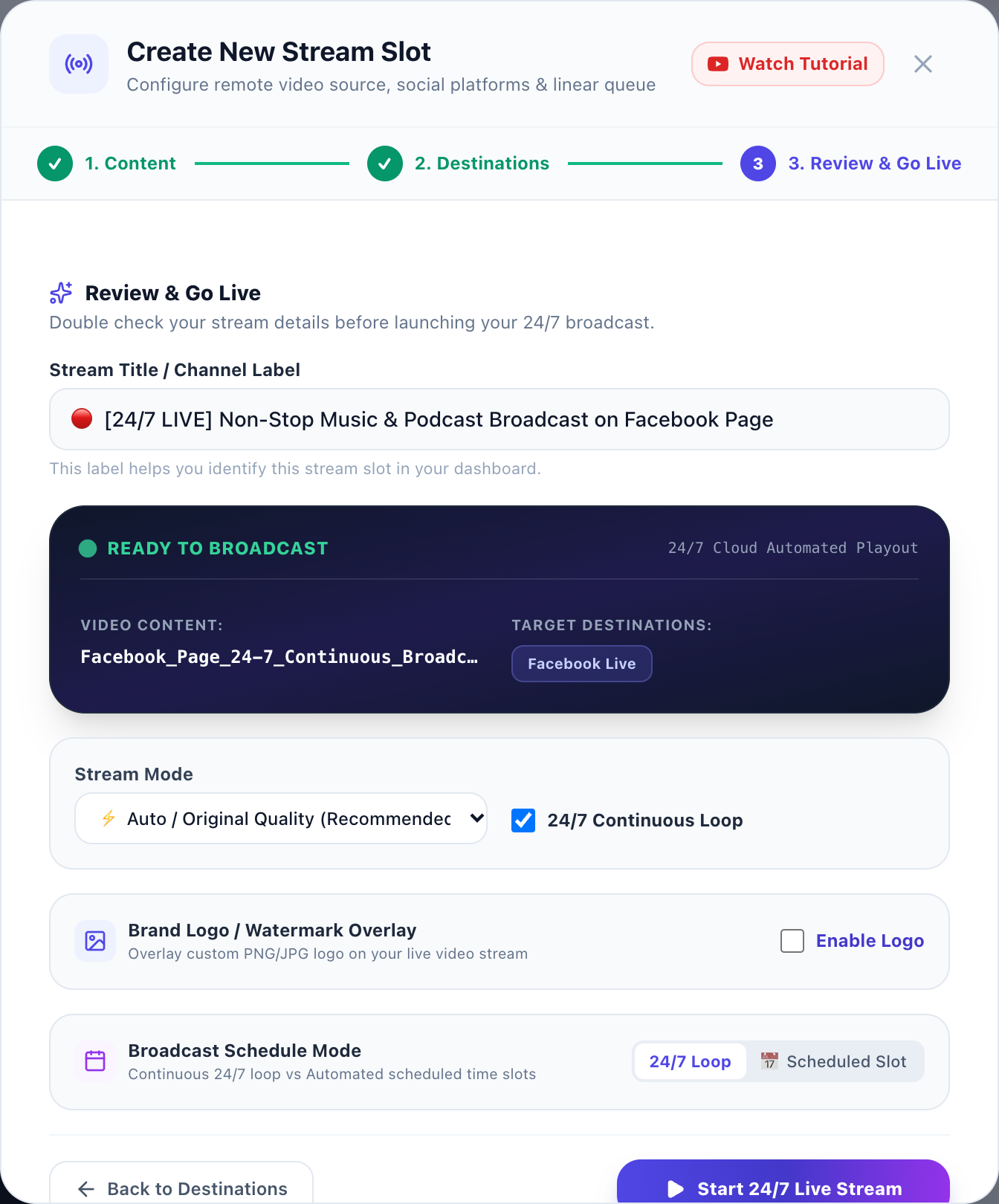
In Step 3 of the stream creation wizard, configure your playout parameters:
- Loop Stream (24/7 Infinite Loop): Check this box! When enabled, AlwaysLive24's zero-latency remuxing engine seamlessly loops your video back to the beginning upon reaching EOF (End of File), ensuring zero dropped frames or blackouts.
- Stream Title: Enter an engaging title with emojis (e.g.
🔴 [24/7 LIVE] Non-Stop Music & Podcast Broadcast on Facebook Page). - Resolution Mode: Choose Direct Remux (-c copy) for 1080p source videos with native 60fps playout and 0% CPU consumption, or select cloud transcoding for custom resolution scaling.
Step 4: Launch Stream & Monitor Real-Time Telemetry
Click the purple "Start 24/7 Live Stream" button. Within 3 to 5 seconds:
- AlwaysLive24 provisions an isolated cloud playout container and establishes a secure TLS RTMPS handshake with Meta's ingest edge servers.
- In your Meta Live Producer window, you will see your live video preview appear with synchronized stereo audio.
- Click "Go Live" in Meta Live Producer to publish the stream to your followers' feeds (or let it auto-publish if scheduled).
- Your AlwaysLive24 dashboard immediately switches to LIVE status, displaying continuous telemetry including uptime, cloud server CPU load (0% local impact), FPS, and automated stream health monitoring.
Top 4 High-Growth Facebook Live Niches in 2026
Leading content creators and digital marketing agencies leverage pre-recorded 24/7 Facebook streams across multiple high-engagement verticals:
🎮 Gaming Replays & Walkthroughs
Loop your best GTA V, Minecraft, or Free Fire moments. Gaming watch parties on Facebook Pages easily generate hundreds of thousands of organic impressions and stars donations.
🎙️ Podcasts & Webinar Reruns
Repurpose your top YouTube podcasts, expert interviews, or sales masterclasses. Replaying webinars on Facebook Live attracts fresh business leads around the clock.
📻 24/7 Lo-Fi & Relaxing Music
Stream continuous relaxing beats, ambient rain sounds, or deep focus music. Viewers leave music streams playing in background tabs for hours, skyrocketing page watch time.
🙏 Devotional & Motivational Content
Broadcast daily prayers, morning affirmations, or spiritual recitations. Devotional streams consistently hold the highest comments-to-viewer ratio on Facebook.
Cloud Playout vs. Local OBS Studio: Complete Comparison
| Feature | AlwaysLive24 Cloud Playout | Traditional OBS on Local PC |
|---|---|---|
| Local Computer Needed | ❌ No (Shut down PC anytime) | ⚠️ Yes (PC must run 24/7/365) |
| Monthly Electricity Cost | $0.00 / month | $35 - $70+ / month |
| Hardware Wear & Fan Noise | Zero hardware wear or noise | Heavy GPU thermal throttling & wear |
| Internet Disconnect Recovery | Automated watchdog reconnect (<5s) | Manual reconnect; stream drops |
| Dedicated Network Bandwidth | 1 Gbps Unmetered Datacenter Fiber | Subject to home ISP throttling |
| Starting Price | Free Starter (₹0) / ₹49 Day Pass | Expensive PC hardware required |
Frequently Asked Questions (FAQ)
Does Facebook allow pre-recorded live streaming?
Yes! Facebook's broadcasting policies explicitly permit pre-recorded streams provided that your content adheres to Meta Community Standards and intellectual property guidelines. Meta encourages creators to label pre-recorded broadcasts in the stream title or description (e.g. [Rerun] or [24/7 Live]) for complete audience transparency.
What is the difference between a Regular Key and a Persistent Stream Key?
A regular stream key is temporary and automatically regenerates after 7 days or whenever a broadcast ends. A Persistent Stream Key never expires—allowing you to start, pause, restart, or continuously loop your AlwaysLive24 stream indefinitely without needing to update settings in Meta Live Producer.
Can I stream to both Facebook and YouTube simultaneously?
Yes! With AlwaysLive24's Multi-Destination RTMP feature, you can broadcast your video feed to Facebook Live and YouTube Live at the exact same time from a single slot, doubling your audience reach without any extra upload bandwidth.
What is the recommended video bitrate and resolution for Facebook Live?
Meta recommends 1080p (1920x1080) at 60 fps or 30 fps with a video bitrate between 4,000 kbps and 6,000 kbps, paired with 128 kbps AAC stereo audio and keyframe interval of 2 seconds. AlwaysLive24 automatically optimizes these parameters to guarantee broadcast compliance.
Ready to Launch Your 24/7 Facebook Live Stream?
Turn your pre-recorded videos into continuous viral broadcasts. Zero local CPU load, zero electricity costs, and 100% automated cloud reliability.