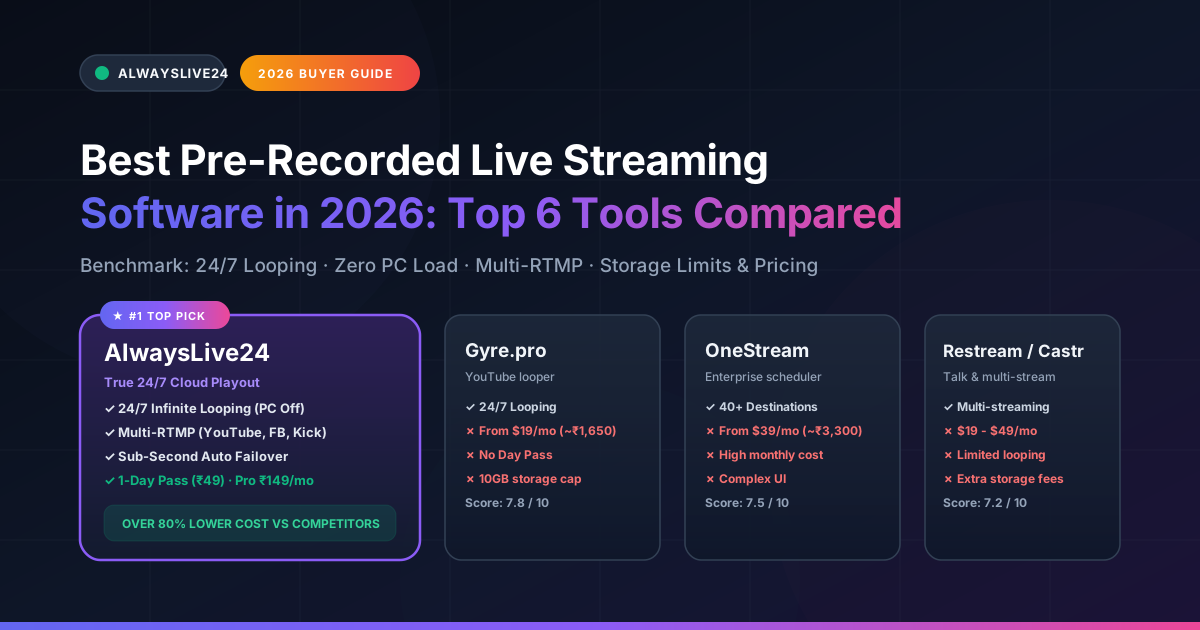
In 2026, pre-recorded live streaming has evolved into the single most effective growth lever for content creators, digital marketers, gaming channels, and media networks. Algorithms across YouTube, Facebook, Twitch, and Kick prioritize active live broadcasts over standard VOD uploads—delivering up to 4x higher organic impressions, accelerated watch time, and continuous ad monetization.
1 The Evolution of Pre-Recorded Live Streaming: Cloud vs Local OBS
Historically, broadcasting pre-recorded video files as a live stream meant running desktop encoders like OBS Studio on your home desktop or laptop. While OBS is a capable open-source tool for live webcam capture, using it for continuous 24/7 video loops introduces severe operational bottlenecks:
The Pain of Local Desktop Streaming (OBS)
- • Constant Hardware Strain: Keeping your computer powered on 24/7 causes thermal throttling, hardware degradation, and high electric bills.
- • Internet Dropouts: Home Wi-Fi jitter or ISP bandwidth resets immediately terminate your live stream, killing your viewer count and ranking.
- • No Computer Mobility: You cannot close your laptop lid, travel, or use your GPU for gaming or video editing while broadcasting.
The Power of Modern Cloud Streaming Software
- • 100% Hardware Independence: Dedicated cloud VPS containers run your stream. Shut down your PC, close laptop lids, or go completely offline.
- • Datacenter Network Uplinks: 1 Gbps unmetered fiber backbone ensures 0% dropped frames and flawless 1080p 60fps playout.
- • Sub-Second Auto-Recovery: Automated watchdogs detect RTMP socket disconnects and reconnect instantly without ending your broadcast.
2 Master Comparison Matrix: Top 6 Pre-Recorded Streaming Software in 2026
We evaluated the leading pre-recorded streaming platforms based on pricing transparency, 24/7 loop capabilities, multi-destination RTMP support, cloud storage quotas, and failover reliability:
| Platform | Starting Price | 24h Day Pass | True 24/7 Loop | Multi-RTMP | Cloud Storage | Failover Recovery | Overall Score |
|---|---|---|---|---|---|---|---|
| #1 Pick AlwaysLive24 | ₹149 / $9.99/mo | ✓ ₹49 / $1.99 | ✓ Unlimited 24/7 | ✓ 4+ Simultaneous | 20 GB – 100 GB R2 | Sub-Second Auto | 9.9 / 10 |
| Gyre.pro | $19 / mo (~₹1,650) | ✗ None | ✓ Unlimited 24/7 | YouTube, FB, Twitch | 10 GB – 30 GB | Standard | 7.8 / 10 |
| OneStream Live | $39 / mo (~₹3,300) | ✗ None | ✓ Unlimited 24/7 | ✓ 40+ Socials | 5 GB – 20 GB | Standard | 7.5 / 10 |
| Restream.io | $19 / mo (~₹1,650) | ✗ None | ✗ Session Caps | ✓ 30+ Socials | Add-on required | Manual Restart | 7.2 / 10 |
| Castr.io | $14.99 / mo (~₹1,300) | ✗ None | ✓ Yes (Paid Plan) | ✓ Custom RTMP | 5 GB – 25 GB | Standard | 7.4 / 10 |
| StreamYard | $25 / mo (~₹2,100) | ✗ None | ✗ Browser/Tab Limit | Limited Destinations | 50 Hours Record | Session-based | 6.9 / 10 |
3 5 Critical Features to Look for in Pre-Recorded Streaming Software
A True 24/7 Autonomous Cloud Playout (No Open Browser Tab Required)
Many budget tools claim to offer "pre-recorded streaming," but require you to keep your browser tab active or rely on client-side WebRTC connections. If your laptop falls asleep, your stream terminates. Legitimate software like AlwaysLive24 transfers your media file onto an isolated cloud streaming container that broadcasts continuously regardless of your device's power state.
B Sub-Second Auto-Recovery & RTMP Reconnect Engine
Platform ingestion servers (especially YouTube and Kick) frequently rotate edge IP sockets or experience micro-buffering. If your streaming software lacks intelligent automated failover, the stream will terminate as "Stream Ended" and notify your viewers. AlwaysLive24 incorporates an automated watchdog that detects network hiccups within 5 seconds and resynchronizes the broadcast buffer without terminating the stream session.
C Fair Multi-Currency Pricing & Flexible Micro-Passes
Legacy platforms charge exorbitant recurring fees ($39 to $89 per month) through international payment processors. For casual streamers, gamers broadcasting a weekend tournament, or event organizers, paying $40+ for a single broadcast is economically unviable. AlwaysLive24 revolutionized this model by offering ₹49 / $1.99 24-Hour Day Passes alongside monthly creator tiers starting at just ₹149 / $9.99/mo.
D Simultaneous Multi-Platform Simulcasting (Multi-RTMP)
Why restrict your pre-recorded video audience to a single channel? Your streaming software should seamlessly duplicate and remux your encoded feed across YouTube Live, Facebook Pages, Kick, Twitch, and Custom RTMP targets simultaneously without requiring additional bandwidth or separate software licenses.
E Flexible Cloud Ingest (Google Drive, Dropbox, Direct URLs)
Uploading large 10GB 1080p video files directly from mobile devices or slow home broadband can take hours. Top-tier tools offer Direct URL & Cloud Drive Ingest: simply paste a Google Drive, Dropbox, or direct MP4 link, and the cloud server downloads the file directly at 100+ MB/s, bypassing your local internet connection entirely.
4 Top 6 Pre-Recorded Live Streaming Software: Detailed Reviews
1. AlwaysLive24
Editor's Choice · #1 WinnerBest Overall Pre-Recorded 24/7 Cloud Streaming Studio for Creators & Businesses
AlwaysLive24 was built from the ground up specifically to solve the limitations of OBS and high-cost enterprise restreamers. Operating on dedicated high-performance European cloud nodes connected to 1 Gbps unmetered bandwidth, AlwaysLive24 enables creators to upload or link pre-recorded videos, set up a 24/7 infinite loop, and walk away—without ever keeping their computer running.
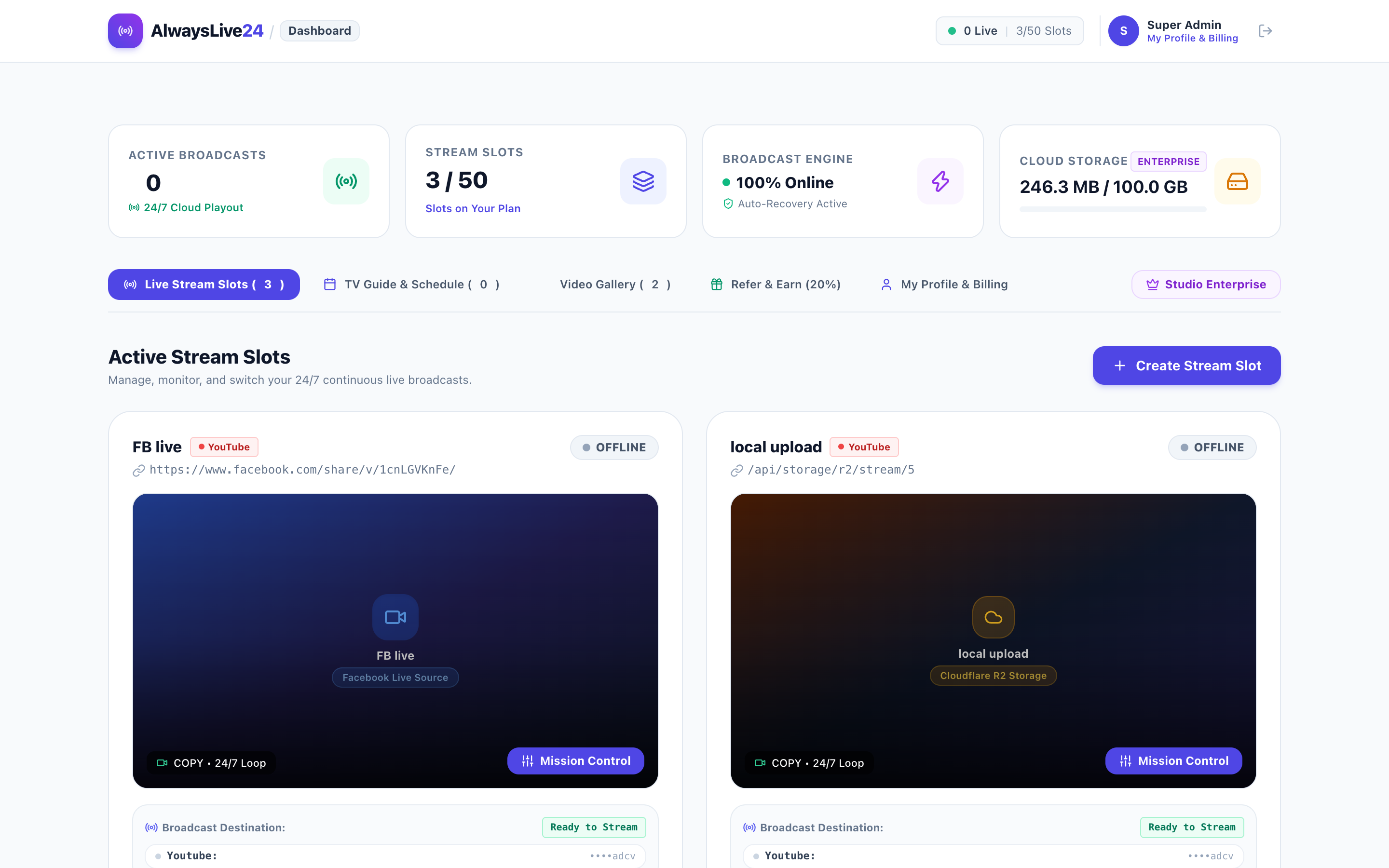
Figure 1: AlwaysLive24 Stream Creation Studio showing Cloud R2 Ingest, Google Drive linking, and the 24/7 Infinite Loop toggle.
Key Advantages:
- • Unrivaled Cost Efficiency: Starts at ₹149 / $9.99/mo for 3 active stream slots and 20GB R2 storage (over 80% cheaper than Gyre or OneStream).
- • ₹49 / $1.99 24-Hour Day Pass: Flexible pay-as-you-go pass for weekend streams and product launches with no subscription contract.
- • Direct Video Link Ingest: Stream directly from Google Drive, Dropbox, YouTube, or direct MP4 links with 0MB local storage consumption.
- • Simultaneous Multi-Destination: Broadcast to YouTube, Facebook, Kick, Twitch, and Custom RTMP simultaneously.
- • Built-in 24/7 Lo-Fi Music Studio: Generate 24/7 chill radio streams with animated backgrounds and royalty-free audio tracks.
- • Sub-Second Stream Watchdog: Automatic reconnection keeps your stream live without viewer drop-off.
Plan Overview:
- • Free Starter: ₹0 / forever (1 slot, 100 MB Cloud R2 storage, 15 min session test limit, 720p HD).
- • 1-Day Pass: ₹49 / $1.99 (1 slot, 24 Hours unmetered streaming, 2 GB storage, 100% watermark-free).
- • Creator Pro: ₹149 / $9.99/mo (3 concurrent slots, 20 GB Cloudflare R2 storage, unlimited 24/7 continuous looping, Multi-RTMP).
- • Studio Enterprise: ₹499 / $29.99/mo (10+ slots, 100 GB Cloudflare R2 storage, priority transcoding).
Figure 2: Real-time telemetry in AlwaysLive24 showing continuous uptime, speed=1.00x, 0% local load, and active cloud health monitoring.
2. Gyre.pro
Specialized YouTube Looping Platform
Gyre.pro is an established player dedicated to continuous pre-recorded live stream loops, particularly on YouTube. It provides reliable cloud streaming with auto-looping features and supports direct uploads.
• Stable 24/7 cloud playout infrastructure.
• Supports looping pre-recorded videos to YouTube and Facebook.
• High monthly price: Entry plan starts at $19/mo (~₹1,650) for only 1 slot.
• No short-term Day Pass options for single events.
• Strict 10GB storage limit on starter tier; additional storage requires expensive upgrades.
• Lacks domestic payment methods (UPI/Paytm) for creators in Asia.
3. OneStream Live
Enterprise Social Media Broadcasting & Scheduling
OneStream Live is a feature-rich multi-platform cloud tool supporting broadcasts to over 40 social channels. It supports scheduled pre-recorded streams and cloud storage integration with Google Drive and OneDrive.
• Massive destination catalog (40+ social platforms).
• Comprehensive scheduled posting calendar.
• Expensive: Standard plan costs $39/mo (~₹3,300), jumping to $89/mo for Pro.
• Complex, cluttered enterprise interface with steep learning curve.
• Pre-recorded video queue length is strictly capped on lower plans.
4. Restream.io
Multi-Streaming Studio for Live Webcams & Scheduled Videos
Restream.io is primarily celebrated as a multi-destination RTMP proxy for real-time live webcam streamers. It includes a "Restream Events" feature allowing scheduled video uploads to broadcast as live events.
• Excellent cross-platform chat consolidation.
• High brand recognition in gaming and interview spaces.
• Not engineered for true 24/7 infinite looping; pre-recorded videos have strict duration caps.
• Pre-recorded video scheduling requires paid plans ($19 to $49+/mo).
• Extra cloud storage requires costly recurring add-on packages.
5. Castr.io
High-End Video Ingestion & 24/7 Pre-recorded Streaming CDN
Castr.io provides dependable cloud hosting, custom RTMP playout, and Akamai-backed CDN video delivery. It supports 24/7 pre-recorded looping streams for businesses and religious organizations.
• High uptime with enterprise CDN infrastructure.
• Reliable infinite video looping capabilities on dedicated plans.
• High starting cost: Plans range from $14.99/mo to $37.50/mo for pre-recorded streaming.
• Video storage quotas (5GB - 25GB) fill up quickly with high-bitrate 1080p content.
• Limited entry-level creative tools (no built-in Lo-Fi generators or automated branding suites).
6. StreamYard
Browser-Based Live Talk Show & Webinar Studio
StreamYard is universally popular for browser-based remote interviews and multi-camera live podcasts. It features a "Pre-recorded Streams" option under its On-Air and Pro tiers.
• Incredibly intuitive interface for bringing remote live guests on screen.
• Direct branding, banner, and lower-third overlays.
• Extremely poor fit for 24/7 looping: pre-recorded broadcasts are capped at 1-2 hours per session.
• Pre-recorded features require the $49/mo plan; basic plans do not support autonomous looping.
• High pricing for creators whose primary need is continuous video playback.
5 Step-by-Step: How to Stream Pre-Recorded Videos 24/7 on AlwaysLive24
Setting up a continuous pre-recorded live stream takes less than 3 minutes. Here is the exact workflow:
Step 1: Ingest Your Video (Upload or Paste Link)
Log in to your AlwaysLive24 dashboard and click Create Stream. You can either upload an MP4/MOV file directly to your Cloudflare R2 storage or select Remote URL to paste a direct Google Drive, Dropbox, or web video link for instant cloud ingestion.
Step 2: Enter Platform RTMP Server & Stream Key
Select your destination (YouTube, Facebook, Kick, Twitch, or Custom RTMP). Paste your stream key from YouTube Studio or Facebook Live Producer. To stream to multiple platforms at the same time, click Add Destination.
Step 3: Enable "Loop Stream (24/7 Infinite Loop)"
Check the Loop Stream (24/7 Infinite Loop) box. This instructs the cloud encoding engine to automatically restart playback seamlessly whenever the video finishes, ensuring your broadcast never stops.
Step 4: Launch & Shut Down Your PC
Click Start Live Broadcast. Within 5–10 seconds, your stream will go live on all selected platforms. You can now close your browser, turn off your computer, or leave your desk—the stream will remain active 24/7 in the cloud.
6 Frequently Asked Questions (FAQ)
Is streaming pre-recorded video allowed on YouTube and Facebook?
Yes. YouTube, Facebook, and Kick fully permit pre-recorded live streaming as long as you own the broadcast rights to the video and audio content. Pre-recorded streams are widely utilized by news networks, music labels, gaming streamers, and educators.
Will my live stream stop if my internet disconnects or my computer turns off?
No! When using AlwaysLive24, 100% of the encoding and streaming takes place inside European cloud datacenters. Your home internet and PC status have zero impact on the live stream once it is started.
Can I test AlwaysLive24 for free?
Yes! AlwaysLive24 offers a permanent Free Starter Plan with 1 active live stream slot, 100 MB Cloudflare R2 storage, 15-minute test broadcast duration, and 720p HD streaming with zero credit card required.
Can I broadcast to multiple platforms at the same time?
Yes. With AlwaysLive24's Multi-RTMP engine, you can stream to YouTube, Facebook, Kick, Twitch, and custom RTMP endpoints simultaneously without using any additional bandwidth or computing power on your end.
Ready to Launch Your 24/7 Pre-Recorded Live Stream?
Stop overheating your computer with OBS and avoid overpriced $39+/month legacy tools. With AlwaysLive24, you can broadcast pre-recorded videos on an infinite 24/7 loop with 0% PC load, enterprise failover reliability, and pricing starting at just ₹49 ($1.99) for a 24-hour pass or ₹149 ($9.99/mo) for Creator Pro.